Share feedback directly with Fabric product managers, participate in targeted research studies and influence the Fabric roadmap.
Sign up nowGet Fabric certified for FREE! Don't miss your chance! Learn more
HI all,
I have a question regarding a filter:
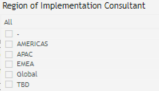
I have a column called "Region of Implementation Consultant"
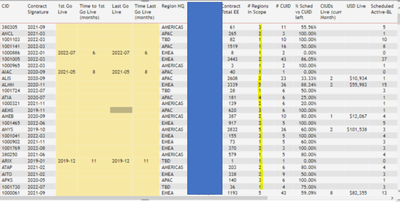
I need to create a Region filter to see if number of regions in the scope has an impact on the time?
Same as the column "#Regions in Scope" but in Filter.
Filter should show 1 (if only onre region), 2 (if 2 regions affected), 3 (if 3 regions), etc..
any help would be appreciated
Thanks
Solved! Go to Solution.
HI Stephen
I got the solution.
# of Regions=
CALCULATE (
DISTINCT COUNT ('Weekly Slippage' [Region of Implementation Consultant] ),
ALLEXCEPT ('Weekly Slippage' ,'Weekly Slippage' [CID] )
)
thanks anyway
Hi @romovaro ,
Sorry, not very clear.
Is there any connection between the number of the region and the field of the slicer?
Whether the number of the region corresponds to the value of the slicer field, or whether the number of the region is related to the number of slicer field filters.
Best Regards,
Stephen Tao
If this post helps, then please consider Accept it as the solution to help the other members find it more quickly.
HI Stephen
I got the solution.
# of Regions=
CALCULATE (
DISTINCT COUNT ('Weekly Slippage' [Region of Implementation Consultant] ),
ALLEXCEPT ('Weekly Slippage' ,'Weekly Slippage' [CID] )
)
thanks anyway
Please provide sanitized sample data that fully covers your issue.
Please show the expected outcome based on the sample data you provided.
If you love stickers, then you will definitely want to check out our Community Sticker Challenge!
Check out the January 2026 Power BI update to learn about new features.
| User | Count |
|---|---|
| 64 | |
| 63 | |
| 48 | |
| 21 | |
| 18 |
| User | Count |
|---|---|
| 118 | |
| 117 | |
| 38 | |
| 36 | |
| 27 |