Get certified for free when you join Fabric Data Days 2026 and dive into Fabric, Power BI, SQL, AI, and other essential data skills.
Join nowJuly 7 - July 17 | Round 2 of the Power BI Dataviz World Championships. Don't miss your chance! Learn more
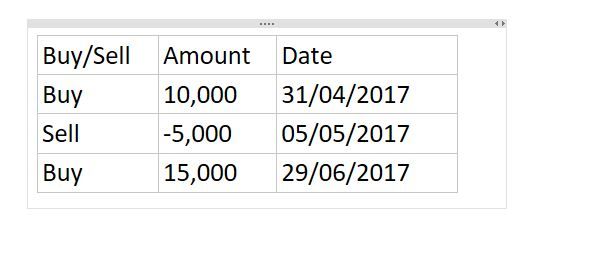
I have a model with 3 columns Buy/Sell (which a text column), Amount (Integer) and Date (Date). I need to be able to subtract sells from buys over a variety of time periods. I can't work out if this should be done as a new calculated column or measure.
Solved! Go to Solution.
Hi,
Try this
=CALCULATE(SUM(Data[Amount]),Data[Buy/Sell]="Buy")
and
=CALCULATE(SUM(Data[Amount]),Data[Buy/Sell]="Sell")
Hope this helps.
Hi @Anonymous,
Please post your expected result based on the sample table, so that we can share the workaround which is close to your requirement.
Best Regards,
Angelia
I am trying to filter all buys with dates into a measure and all sells into a measure so that I can subtract sells from buys over anytime period.
Hi,
Try this
=CALCULATE(SUM(Data[Amount]),Data[Buy/Sell]="Buy")
and
=CALCULATE(SUM(Data[Amount]),Data[Buy/Sell]="Sell")
Hope this helps.
Hi @Anonymous,
What result are you expecting?
Hi @Anonymous
A measure should work.
I assume all the sell records have a minus sign so ...
Measure1 = SUM(TableName[Amount])
should work
If you create a visual and place the date in one axis or column or whatever visual you choose and in the values of that visual you place Measure1 should work with no problems.
Hope that helps
Vicente
Join us in Barcelona for FabCon and SQLCon, the Fabric, Power BI, SQL, and AI community event. Save €200 with code FABCMTY200.
Join Data Days 2026: 60 days of free live/on-demand sessions, challenges, study groups, and certification opportunities.
| User | Count |
|---|---|
| 29 | |
| 27 | |
| 24 | |
| 24 | |
| 18 |
| User | Count |
|---|---|
| 54 | |
| 50 | |
| 43 | |
| 33 | |
| 32 |