Join us at FabCon Atlanta from March 16 - 20, 2026, for the ultimate Fabric, Power BI, AI and SQL community-led event. Save $200 with code FABCOMM.
Register now!The Power BI Data Visualization World Championships is back! Get ahead of the game and start preparing now! Learn more
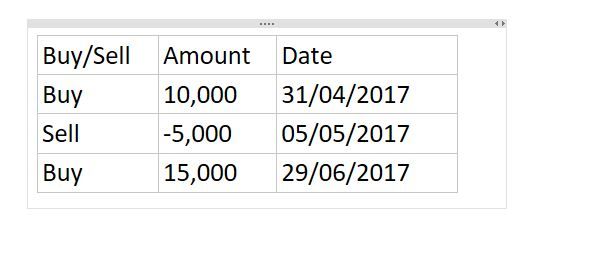
I have a model with 3 columns Buy/Sell (which a text column), Amount (Integer) and Date (Date). I need to be able to subtract sells from buys over a variety of time periods. I can't work out if this should be done as a new calculated column or measure.
Solved! Go to Solution.
Hi,
Try this
=CALCULATE(SUM(Data[Amount]),Data[Buy/Sell]="Buy")
and
=CALCULATE(SUM(Data[Amount]),Data[Buy/Sell]="Sell")
Hope this helps.
Hi @Anonymous,
Please post your expected result based on the sample table, so that we can share the workaround which is close to your requirement.
Best Regards,
Angelia
I am trying to filter all buys with dates into a measure and all sells into a measure so that I can subtract sells from buys over anytime period.
Hi,
Try this
=CALCULATE(SUM(Data[Amount]),Data[Buy/Sell]="Buy")
and
=CALCULATE(SUM(Data[Amount]),Data[Buy/Sell]="Sell")
Hope this helps.
Hi @Anonymous,
What result are you expecting?
Hi @Anonymous
A measure should work.
I assume all the sell records have a minus sign so ...
Measure1 = SUM(TableName[Amount])
should work
If you create a visual and place the date in one axis or column or whatever visual you choose and in the values of that visual you place Measure1 should work with no problems.
Hope that helps
Vicente
The Power BI Data Visualization World Championships is back! Get ahead of the game and start preparing now!
| User | Count |
|---|---|
| 40 | |
| 35 | |
| 34 | |
| 31 | |
| 27 |
| User | Count |
|---|---|
| 135 | |
| 102 | |
| 67 | |
| 65 | |
| 56 |