Don't miss your chance to take the Fabric Data Engineer (DP-600) exam for FREE! Find out how by attending the DP-600 session on April 23rd (pacific time), live or on-demand.
Learn moreNext up in the FabCon + SQLCon recap series: The roadmap for Microsoft SQL and Maximizing Developer experiences in Fabric. All sessions are available on-demand after the live show. Register now
Earlier, I have received great help with this issue, but it turned out my table was more complex than I realised, and the solution ceased working as desired. I have tried to tweak on my measures, but to help avail.
I wish to create a report where stores with 0 sales of a product is listed (regardless of packaging).
The data table has a structure like this:
| Store | ProductCategory | Product | Sales |
| Store A | Alfa | Product A - Single | 0 |
| Store A | Alfa | Product A - Multipack | 4 |
| Store A | Bravo | Product B - Single | 0 |
| Store A | Bravo | Product B - Multipack | 0 |
| Store B | Alfa | Product A - Single | 0 |
| Store B | Alfa | Product A - Multipack | 8 |
| Store B | Bravo | Product B - Single | 10 |
| Store B | Bravo | Product B - Multipack | 0 |
I have two measures:
1.
| ProductCategory | ||
| Store | Alfa | Bravo |
| Store A | 0 |
| ProductCategory | ||
| Store | Alfa | Bravo |
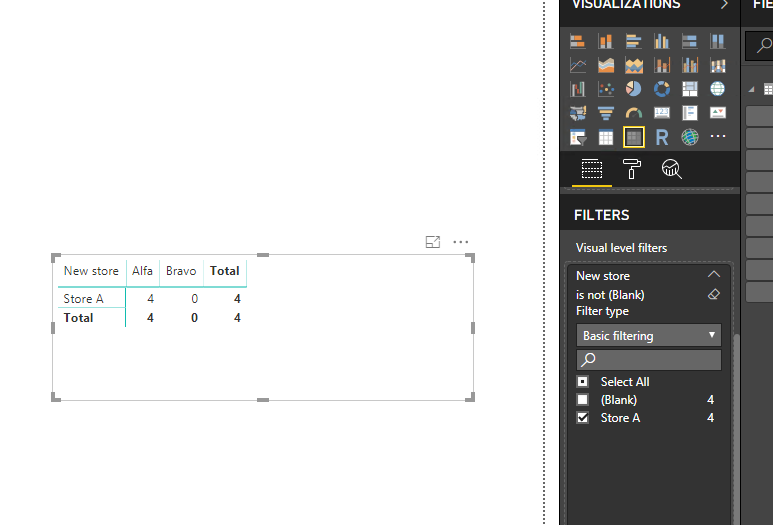
| Store A | 4 | 0 |
Any suggestions on what I must change to get to the desired result?
/depple
Solved! Go to Solution.
Hi @depple ,
We can create two calculated columns to work on it.
Column = var sum1= CALCULATE(SUM('Table 1'[Sales]),ALLEXCEPT('Table 1','Table 1'[Store],'Table 1'[ProductCategory]))
return
IF(sum1=0,'Table 1'[Store],BLANK())
New store = IF('Table 1'[Store] in VALUES('Table 1'[Column]),'Table 1'[Store],BLANK())
Please find the pbix as attached.
Regards,
Frank
Hi @depple ,
We can create two calculated columns to work on it.
Column = var sum1= CALCULATE(SUM('Table 1'[Sales]),ALLEXCEPT('Table 1','Table 1'[Store],'Table 1'[ProductCategory]))
return
IF(sum1=0,'Table 1'[Store],BLANK())
New store = IF('Table 1'[Store] in VALUES('Table 1'[Column]),'Table 1'[Store],BLANK())
Please find the pbix as attached.
Regards,
Frank
Thanks a million! It worked perfect, and it also sorted out some other difficulties that I had.
/depple
If you have recently started exploring Fabric, we'd love to hear how it's going. Your feedback can help with product improvements.
A new Power BI DataViz World Championship is coming this June! Don't miss out on submitting your entry.
Experience the highlights from FabCon & SQLCon, available live and on-demand starting April 14th.
| User | Count |
|---|---|
| 48 | |
| 40 | |
| 40 | |
| 20 | |
| 16 |
| User | Count |
|---|---|
| 70 | |
| 67 | |
| 32 | |
| 27 | |
| 26 |