cancel
Showing results for 
Search instead for 
Did you mean: 

We've captured the moments from FabCon & SQLCon that everyone is talking about, and we are bringing them to the community, live and on-demand. Starts on April 14th. Register now

Reply
depple
Helper III
Helper III

Filtering

Earlier, I have received great help with this issue, but it turned out my table was more complex than I realised, and the solution ceased working as desired. I have tried to tweak on my measures, but to help avail.


I wish to create a report where stores with 0 sales of a product is listed (regardless of packaging).


The data table has a structure like this:


StoreProductCategoryProductSales
Store AAlfaProduct A - Single0
Store AAlfaProduct A - Multipack4
Store ABravoProduct B - Single0
Store ABravoProduct B - Multipack0
Store BAlfaProduct A - Single0
Store BAlfaProduct A - Multipack8
Store BBravoProduct B - Single10
Store BBravoProduct B - Multipack0


I have two measures:

1. 

ZeroSale = VAR StoresWithZeroProduct =
FILTER (
VALUES ( 'Table 1'[Store] );
NOT ISEMPTY ( FILTER ('Table 1'; [SumDpak] = 0 ) )
)
RETURN
CALCULATE( [SumDpak]; KEEPFILTERS ( StoresWithZeroProduct))
 
2. 
SumDpak = CALCULATE(SUM('Table 1'[Sales]);ALLEXCEPT('Table 1';'Table 1'[ProductCategory];'Table 1'[Store]))
 
With my current measures the report looks like this:
 
 ProductCategory
StoreAlfaBravo
Store A 0
 
 I want the report to look like this:
 
 ProductCategory
StoreAlfaBravo
Store A40


Any suggestions on what I must change to get to the desired result?


/depple

1 ACCEPTED SOLUTION
v-frfei-msft
Community Support
Community Support

Hi @depple ,


We can create two calculated columns to work on it.


Column = var sum1= CALCULATE(SUM('Table 1'[Sales]),ALLEXCEPT('Table 1','Table 1'[Store],'Table 1'[ProductCategory]))
return
IF(sum1=0,'Table 1'[Store],BLANK())
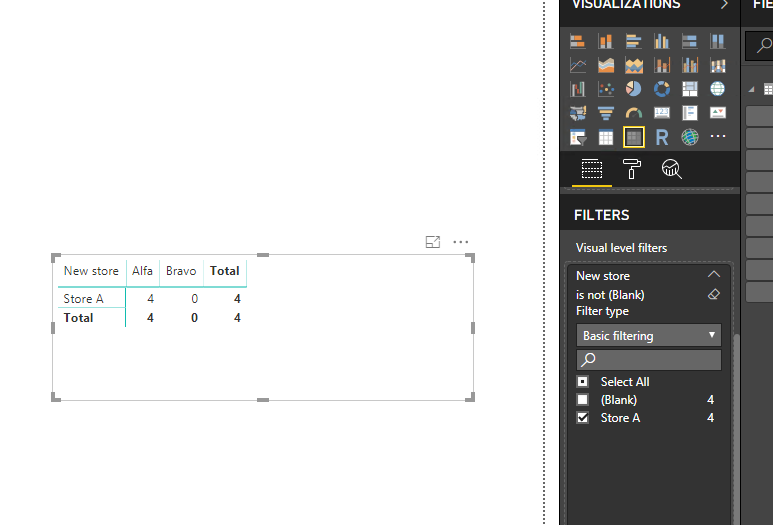
New store = IF('Table 1'[Store] in VALUES('Table 1'[Column]),'Table 1'[Store],BLANK())


Capture.PNG


Please find the pbix as attached.


Regards,

Frank

Community Support Team _ Frank
If this post helps, then please consider Accept it as the solution to help the others find it more quickly.

View solution in original post

2 REPLIES 2
v-frfei-msft
Community Support
Community Support

Hi @depple ,


We can create two calculated columns to work on it.


Column = var sum1= CALCULATE(SUM('Table 1'[Sales]),ALLEXCEPT('Table 1','Table 1'[Store],'Table 1'[ProductCategory]))
return
IF(sum1=0,'Table 1'[Store],BLANK())
New store = IF('Table 1'[Store] in VALUES('Table 1'[Column]),'Table 1'[Store],BLANK())


Capture.PNG


Please find the pbix as attached.


Regards,

Frank

Community Support Team _ Frank
If this post helps, then please consider Accept it as the solution to help the others find it more quickly.

@v-frfei-msft 


Thanks a million! It worked perfect, and it also sorted out some other difficulties that I had.


/depple

Helpful resources

Announcements
New to Fabric survey Carousel

New to Fabric Survey

If you have recently started exploring Fabric, we'd love to hear how it's going. Your feedback can help with product improvements.

Power BI DataViz World Championships carousel

Power BI DataViz World Championships - June 2026

A new Power BI DataViz World Championship is coming this June! Don't miss out on submitting your entry.

Join our Fabric User Panel

Join our Fabric User Panel

Share feedback directly with Fabric product managers, participate in targeted research studies and influence the Fabric roadmap.

March Power BI Update Carousel

Power BI Community Update - March 2026

Check out the March 2026 Power BI update to learn about new features.