cancel
Showing results for 
Search instead for 
Did you mean: 

The Power BI Data Visualization World Championships is back! Get ahead of the game and start preparing now! Learn more

Reply
ouss102
Frequent Visitor

Filtering through multiple columns using one filter

Hi everyone,


Let's say I have this type of data : 


OfferBuyer.1Buyer.2Buyer.3
AAlex  
BSamAlex 
CJohnSam 


I need a way to filter through buyers using one slicer, for example, if I filter on Alex, expected result should be this :


OfferBuyer.1Buyer.2Buyer.3
AAlex  
BSamAlex 


Any idea how to achieve this ? thanks in advance


1 ACCEPTED SOLUTION
selimovd
Super User
Super User

Hey @ouss102 ,


that is possible.

Create a new table with DAX that you are using as a slicer:

Buyer = 
FILTER(
    DISTINCT(
        UNION(
            VALUES( myTable[Buyer.1] ),
            VALUES( myTable[Buyer.2] ),
            VALUES( myTable[Buyer.3] )
        )
    ),
    myTable[Buyer.1]
        <> BLANK()
)


As I said, this you can use to slice the names later.

Then you create a measure that checks for every row if the name appears in one of the 3 columns:

ShowRow =
VAR vSelected = ALLSELECTED( Buyer[Buyer] )
VAR vAvailableNamesTable =
    FILTER(
        DISTINCT(
            UNION(
                VALUES( myTable[Buyer.1] ),
                VALUES( myTable[Buyer.2] ),
                VALUES( myTable[Buyer.3] )
            )
        ),
        myTable[Buyer.1] <> BLANK()
    )
VAR vIntersect = INTERSECT( vSelected, vAvailableNamesTable )
RETURN
    COUNTROWS( vIntersect )


Use this measure as a filter for the visual for the table you want to show and filter it to ShowRow = 1:
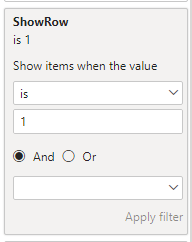
selimovd_0-1628603892307.png


Then the result is doing exactly what you want:
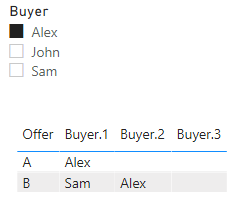
selimovd_1-1628603947378.png


Please check my demo file:

https://www.swisstransfer.com/d/0dac3f4b-4189-4e0b-b1e9-edaefdbe5c09


If you need any help please let me know.
If I answered your question I would be happy if you could mark my post as a solution ✔️ and give it a thumbs up 👍
 
Best regards
Denis


View solution in original post

3 REPLIES 3
selimovd
Super User
Super User

Hey @ouss102 ,


that is possible.

Create a new table with DAX that you are using as a slicer:

Buyer = 
FILTER(
    DISTINCT(
        UNION(
            VALUES( myTable[Buyer.1] ),
            VALUES( myTable[Buyer.2] ),
            VALUES( myTable[Buyer.3] )
        )
    ),
    myTable[Buyer.1]
        <> BLANK()
)


As I said, this you can use to slice the names later.

Then you create a measure that checks for every row if the name appears in one of the 3 columns:

ShowRow =
VAR vSelected = ALLSELECTED( Buyer[Buyer] )
VAR vAvailableNamesTable =
    FILTER(
        DISTINCT(
            UNION(
                VALUES( myTable[Buyer.1] ),
                VALUES( myTable[Buyer.2] ),
                VALUES( myTable[Buyer.3] )
            )
        ),
        myTable[Buyer.1] <> BLANK()
    )
VAR vIntersect = INTERSECT( vSelected, vAvailableNamesTable )
RETURN
    COUNTROWS( vIntersect )


Use this measure as a filter for the visual for the table you want to show and filter it to ShowRow = 1:

selimovd_0-1628603892307.png


Then the result is doing exactly what you want:

selimovd_1-1628603947378.png


Please check my demo file:

https://www.swisstransfer.com/d/0dac3f4b-4189-4e0b-b1e9-edaefdbe5c09


If you need any help please let me know.
If I answered your question I would be happy if you could mark my post as a solution ✔️ and give it a thumbs up 👍
 
Best regards
Denis


I woud modify " is 1" by "more or equal than 1" so that it shows everything when the filter is released, but otherwise I think this might work, thanks !

Hey @ouss102 ,


yes, that's absolutely right. I forgot about the option that there could be more than one 😊


Best regards

Denis

Helpful resources

Announcements
Power BI DataViz World Championships

Power BI Dataviz World Championships

The Power BI Data Visualization World Championships is back! Get ahead of the game and start preparing now!

December 2025 Power BI Update Carousel

Power BI Monthly Update - December 2025

Check out the December 2025 Power BI Holiday Recap!

FabCon Atlanta 2026 carousel

FabCon Atlanta 2026

Join us at FabCon Atlanta, March 16-20, for the ultimate Fabric, Power BI, AI and SQL community-led event. Save $200 with code FABCOMM.