Don't miss your chance to take the Fabric Data Engineer (DP-600) exam for FREE! Find out how by watching the DP-600 session on-demand now through April 28th.
Learn moreJoin the FabCon + SQLCon recap series. Up next: Power BI, Real-Time Intelligence, IQ and AI, and Data Factory take center stage. All sessions are available on-demand after the live show. Register now
Hi everyone,
Let's say I have this type of data :
| Offer | Buyer.1 | Buyer.2 | Buyer.3 |
| A | Alex | ||
| B | Sam | Alex | |
| C | John | Sam |
I need a way to filter through buyers using one slicer, for example, if I filter on Alex, expected result should be this :
| Offer | Buyer.1 | Buyer.2 | Buyer.3 |
| A | Alex | ||
| B | Sam | Alex |
Any idea how to achieve this ? thanks in advance
Solved! Go to Solution.
Hey @ouss102 ,
that is possible.
Create a new table with DAX that you are using as a slicer:
Buyer =
FILTER(
DISTINCT(
UNION(
VALUES( myTable[Buyer.1] ),
VALUES( myTable[Buyer.2] ),
VALUES( myTable[Buyer.3] )
)
),
myTable[Buyer.1]
<> BLANK()
)
As I said, this you can use to slice the names later.
Then you create a measure that checks for every row if the name appears in one of the 3 columns:
ShowRow =
VAR vSelected = ALLSELECTED( Buyer[Buyer] )
VAR vAvailableNamesTable =
FILTER(
DISTINCT(
UNION(
VALUES( myTable[Buyer.1] ),
VALUES( myTable[Buyer.2] ),
VALUES( myTable[Buyer.3] )
)
),
myTable[Buyer.1] <> BLANK()
)
VAR vIntersect = INTERSECT( vSelected, vAvailableNamesTable )
RETURN
COUNTROWS( vIntersect )
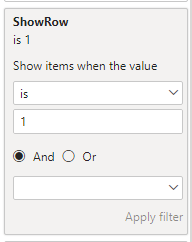
Use this measure as a filter for the visual for the table you want to show and filter it to ShowRow = 1:
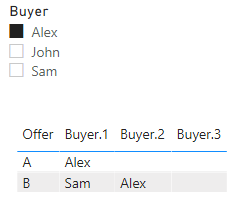
Then the result is doing exactly what you want:
Please check my demo file:
https://www.swisstransfer.com/d/0dac3f4b-4189-4e0b-b1e9-edaefdbe5c09
Hey @ouss102 ,
that is possible.
Create a new table with DAX that you are using as a slicer:
Buyer =
FILTER(
DISTINCT(
UNION(
VALUES( myTable[Buyer.1] ),
VALUES( myTable[Buyer.2] ),
VALUES( myTable[Buyer.3] )
)
),
myTable[Buyer.1]
<> BLANK()
)
As I said, this you can use to slice the names later.
Then you create a measure that checks for every row if the name appears in one of the 3 columns:
ShowRow =
VAR vSelected = ALLSELECTED( Buyer[Buyer] )
VAR vAvailableNamesTable =
FILTER(
DISTINCT(
UNION(
VALUES( myTable[Buyer.1] ),
VALUES( myTable[Buyer.2] ),
VALUES( myTable[Buyer.3] )
)
),
myTable[Buyer.1] <> BLANK()
)
VAR vIntersect = INTERSECT( vSelected, vAvailableNamesTable )
RETURN
COUNTROWS( vIntersect )
Use this measure as a filter for the visual for the table you want to show and filter it to ShowRow = 1:
Then the result is doing exactly what you want:
Please check my demo file:
https://www.swisstransfer.com/d/0dac3f4b-4189-4e0b-b1e9-edaefdbe5c09
I woud modify " is 1" by "more or equal than 1" so that it shows everything when the filter is released, but otherwise I think this might work, thanks !
Hey @ouss102 ,
yes, that's absolutely right. I forgot about the option that there could be more than one 😊
Best regards
Denis
Check out the April 2026 Power BI update to learn about new features.
If you have recently started exploring Fabric, we'd love to hear how it's going. Your feedback can help with product improvements.
A new Power BI DataViz World Championship is coming this June! Don't miss out on submitting your entry.
| User | Count |
|---|---|
| 43 | |
| 37 | |
| 34 | |
| 21 | |
| 16 |
| User | Count |
|---|---|
| 65 | |
| 64 | |
| 31 | |
| 26 | |
| 25 |