Share feedback directly with Fabric product managers, participate in targeted research studies and influence the Fabric roadmap.
Sign up nowGet Fabric certified for FREE! Don't miss your chance! Learn more
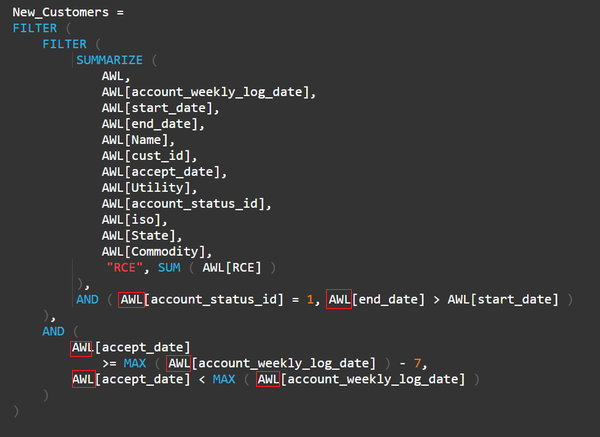
I have a summarized table showing new customers from the most recent week. I also have a page-level filter of states (e.g. NY, NJ, OH) that is from the original table. When no filters are in place, then the new customers table matches the new customers trend line. However, if I filter by state, for example, then they don't match. I noticed that when I filter by NJ there are somehow rows containing PA in my new customers table. It's because this new customer has accounts in both NJ and PA, but why wouldn't the State filter clear out the PA accounts? I'm assuming it has to do with evaluation context, but I can't figure out the exact issue. Here's my formula for the summarized new customers table:
Hi @iDataDrew,
You can use a variable to store the summary table, then use filter function to filter records.
For example:
New Table= Var temp= Summarize(AWL,[account_weekly_log_date],[start_date],[end_date],[name],[cust_id],[accept_date],[Utility],[account_status_id],[iso],[State],[Commodity],"RCE",SUM(AWL[RCE])) return Filter(temp,AND([account_status_id]=1,[end_date]>[start_date])&&AND([accept_date]>=max([account_weekly_log_date])-7,[accept_date]<max([account_weekly_log_date])))
If above not help, please provide a sample file to test.
Regards,
Xiaoxin Sheng
@Anonymous isn't that essentially the same thing that I have, only using a variable?
Hi @iDataDrew,
>>isn't that essentially the same thing that I have, only using a variable?
Since the summary table is a new table which unnamed in the formula, I'd like to suggest you direct use column name to call new table column.(original table's column may doesn't work on new table)
Regards,
Xiaoxin Sheng
Hi @iDataDrew
Try creating a slicer from the statecolumn of the summarized table. Remove the page level filter.
Cheers
CheenuSing
If you love stickers, then you will definitely want to check out our Community Sticker Challenge!
Check out the January 2026 Power BI update to learn about new features.
| User | Count |
|---|---|
| 64 | |
| 63 | |
| 49 | |
| 21 | |
| 18 |
| User | Count |
|---|---|
| 122 | |
| 118 | |
| 38 | |
| 36 | |
| 29 |