cancel
Showing results for 
Search instead for 
Did you mean: 

Next up in the FabCon + SQLCon recap series: The roadmap for Microsoft SQL and Maximizing Developer experiences in Fabric. All sessions are available on-demand after the live show. Register now

Reply
CROforce
Helper I
Helper I

Filtering issue

Can anyone point out what is wrong with this formula:

RTM 1 Open = 
COUNTAX (
    FILTER (
        'observation',
        'observation'[Date Opened] = 'Query1'[Date Open]
            && ( 'observation'[Gating Milestone] = "DVT 1" )
            && ( 'observation'[Gating Milestone] = "DVT 2" )
    ),
    'observation'[Date Opened]
    )

I need to use multiple filters to count number of observations that occured on certail dates but for some reason this isn't working... The column is blank however if I let's say remove this string from the formula:

&& ( 'observation'[Gating Milestone] = "DVT 2" )

then I will be getting proper resoults/ counts  for DVT 1 obeservations 😞

5 REPLIES 5
Greg_Deckler
Community Champion
Community Champion

RTM 1 Open = 
COUNTAX (
    FILTER (
        'observation',
        'observation'[Date Opened] = 'Query1'[Date Open]
            && ( 'observation'[Gating Milestone] = "DVT 1" )
            || ( 'observation'[Gating Milestone] = "DVT 2" )
    ),
    'observation'[Date Opened]
    )


Unless I am mistaking, Gating Milestone cannot be both DVT 1 and DVT 2 at the same time.


Follow on LinkedIn
@ me in replies or I'll lose your thread!!!
Instead of a Kudo, please vote for this idea
Become an expert!: Enterprise DNA
External Tools: MSHGQM
YouTube Channel!: Microsoft Hates Greg
Latest book!:
DAX For Humans

DAX is easy, CALCULATE makes DAX hard...

Is there a way to achiveee this?

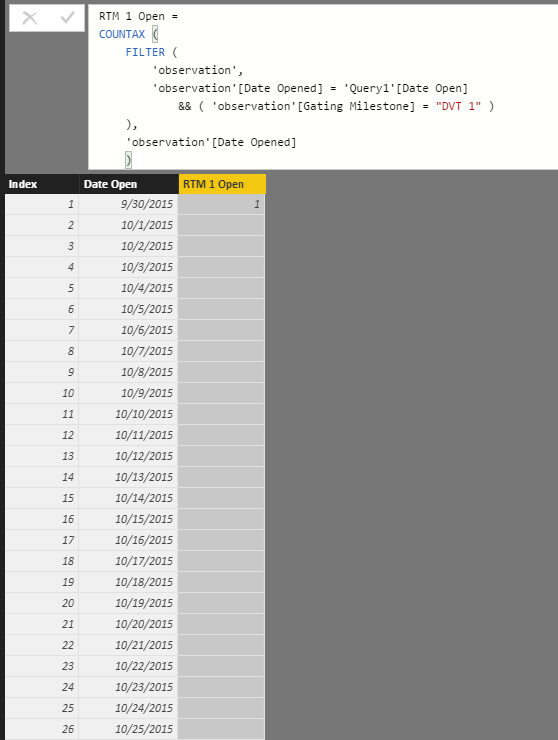
This is what it looks like if I only filter by DVT 1:

Capture.PNG


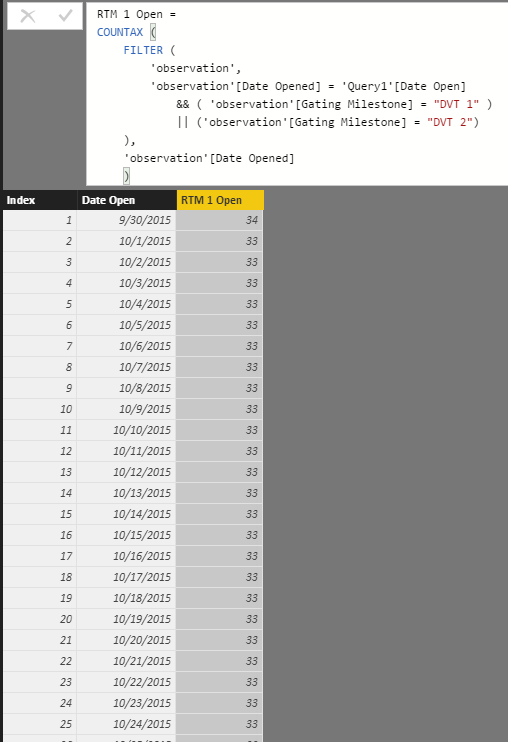
I have noticed in formula you listed below, it has ||, if I replace my formula with yours, I am not getting proper filtering:

Capture.PNG

Nearly impossible to figure this out without sample data, but maybe this:


RTM 1 Open = 
CALCULATE(COUNTA('observation'[Date Opened]),'observation'[Date Opened] = 'Query1'[Date Open], 'observation'[Gating Milestone] = "DVT 1" || 'observation'[Gating Milestone] = "DVT 2")

Is the table that you are showing the "observation" table or is that a different, related table or?


Follow on LinkedIn
@ me in replies or I'll lose your thread!!!
Instead of a Kudo, please vote for this idea
Become an expert!: Enterprise DNA
External Tools: MSHGQM
YouTube Channel!: Microsoft Hates Greg
Latest book!:
DAX For Humans

DAX is easy, CALCULATE makes DAX hard...

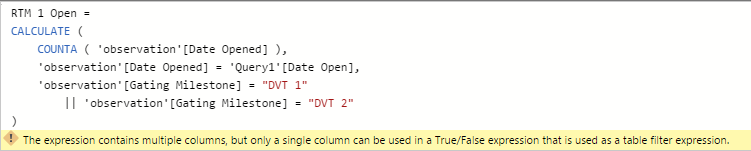
Thank you for all you your help but unfortunately that didn't work:

Capture.PNG


I am fearly new to Power BI and not sure if there is a way/ how to share sample data 😞

Anonymous
Not applicable

Hi @CROforce,


if you write multiple conditions in calculate, please use filter function to merge them, for example:


RTM 1 Open = 
CALCULATE(COUNTA('observation'[Date Opened]), Filter(all(observation),'observation'[Date Opened] = 'Query1'[Date Open]&&OR('observation'[Gating Milestone] = "DVT 1" , 'observation'[Gating Milestone] = "DVT 2")))


Regards,
Xiaoxin Sheng

Helpful resources

Announcements
New to Fabric survey Carousel

New to Fabric Survey

If you have recently started exploring Fabric, we'd love to hear how it's going. Your feedback can help with product improvements.

Power BI DataViz World Championships carousel

Power BI DataViz World Championships - June 2026

A new Power BI DataViz World Championship is coming this June! Don't miss out on submitting your entry.

Join our Fabric User Panel

Join our Fabric User Panel

Share feedback directly with Fabric product managers, participate in targeted research studies and influence the Fabric roadmap.

March Power BI Update Carousel

Power BI Community Update - March 2026

Check out the March 2026 Power BI update to learn about new features.