This time we’re going bigger than ever. Fabric, Power BI, SQL, AI and more. We're covering it all. You won't want to miss it.
Learn moreGet Fabric Certified for FREE during AI Skills Fest. This week only. Secure your voucher now.
Solved! Go to Solution.
Thank you, @DataInsights !
It is not displaying the exact percentages while using your formula. I will recheck later. Some filters are also applied, and it might be the cause.
I have already got the job done with a mere tweaking.
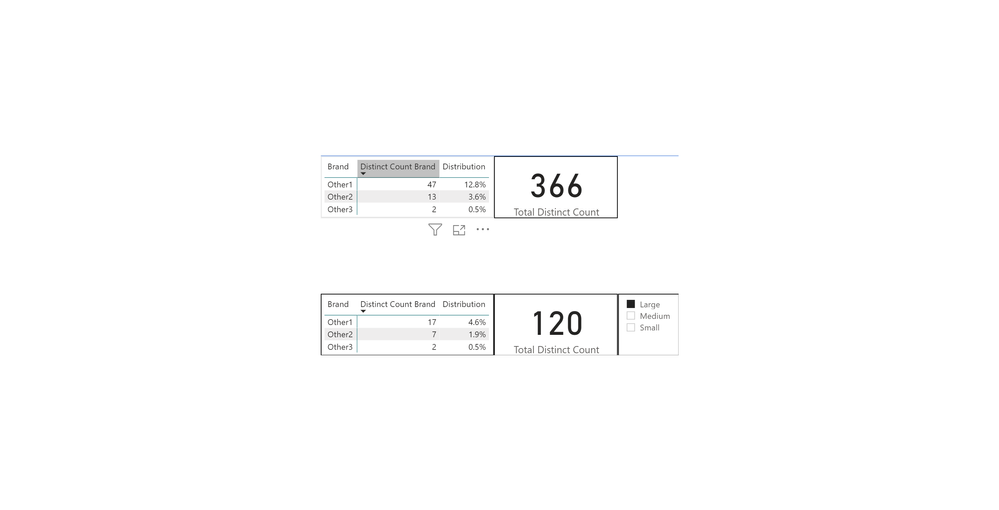
Try this measure. It uses ALLSELECTED, instead of ALL.
Distribution =
DIVIDE (
DISTINCTCOUNT ( Table1[Brand Availability] ),
CALCULATE ( DISTINCTCOUNT ( Table1[Store ID] ), ALLSELECTED ( Table1 ) )
)
Proud to be a Super User!
Thank you, @DataInsights !
It is not displaying the exact percentages while using your formula. I will recheck later. Some filters are also applied, and it might be the cause.
I have already got the job done with a mere tweaking.
Check out the May 2026 Power BI update to learn about new features.
Sign up to receive a private message when registration opens and key events begin.
If you have recently started exploring Fabric, we'd love to hear how it's going. Your feedback can help with product improvements.
| User | Count |
|---|---|
| 24 | |
| 24 | |
| 21 | |
| 21 | |
| 18 |
| User | Count |
|---|---|
| 56 | |
| 53 | |
| 49 | |
| 26 | |
| 26 |