Don't miss your chance to take exam DP-600 or DP-700 on us!
Request nowLearn from the best! Meet the four finalists headed to the FINALS of the Power BI Dataviz World Championships! Register now
Hello,
I've seen multiple examples where data in visuals is automatically be filtered based on the selected drillthrough value.
However, my specific use case seems somewhat more complex than the used examples.
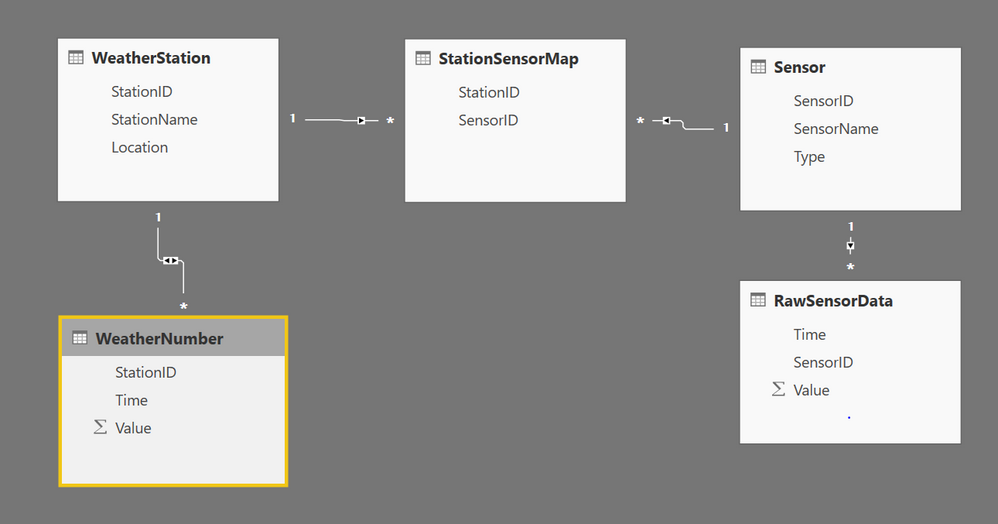
I have following relationships between my tables:
When I want to drillthrough on a map showing the locations of the weather stations, I want to show the report a linegraph containing raw sensor data belonging to that specific weather station. Next, there should be a slicer containins all those sensor names so the user can filter amoungst the relevant raw data values beloning to the weather station.
Unfortunately, Power BI is not able to automatically detect this & I do not have a clue how to solve this issue.
Thanks in advance for your help.
Best,
Tie-Tie
Solved! Go to Solution.
Enable bi-directional filter Sensor to StationSensorMap works for me.
Thank you, works perfectly now!
Share feedback directly with Fabric product managers, participate in targeted research studies and influence the Fabric roadmap.
Check out the February 2026 Power BI update to learn about new features.
| User | Count |
|---|---|
| 53 | |
| 49 | |
| 33 | |
| 16 | |
| 15 |
| User | Count |
|---|---|
| 85 | |
| 70 | |
| 38 | |
| 28 | |
| 25 |