A new Data Days event is coming soon!
This time we’re going bigger than ever. Fabric, Power BI, SQL, AI and more. We're covering it all. You won't want to miss it.
Learn more- Power BI forums
- Get Help with Power BI
- Desktop
- Service
- Report Server
- Power Query
- Mobile Apps
- Developer
- DAX Commands and Tips
- Custom Visuals Development Discussion
- Health and Life Sciences
- Power BI Spanish forums
- Translated Spanish Desktop
- Training and Consulting
- Instructor Led Training
- Dashboard in a Day for Women, by Women
- Galleries
- Data Stories Gallery
- Themes Gallery
- Contests Gallery
- QuickViz Gallery
- Quick Measures Gallery
- Visual Calculations Gallery
- Notebook Gallery
- Translytical Task Flow Gallery
- TMDL Gallery
- R Script Showcase
- Webinars and Video Gallery
- Ideas
- Custom Visuals Ideas (read-only)
- Issues
- Issues
- Events
- Upcoming Events
Get Fabric Certified for FREE during AI Skills Fest. This week only. Secure your voucher now.
- Power BI forums
- Forums
- Get Help with Power BI
- Desktop
- Re: Filter values x-axis dynamically
- Subscribe to RSS Feed
- Mark Topic as New
- Mark Topic as Read
- Float this Topic for Current User
- Bookmark
- Subscribe
- Printer Friendly Page

- Mark as New
- Bookmark
- Subscribe
- Mute
- Subscribe to RSS Feed
- Permalink
- Report Inappropriate Content
Filter values x-axis dynamically
Hi! I created a monthly percent difference chart using Power BI's quick measure, month-over-month change. My problem is the value for the next month (-100%) always appear in the chart. I only want up until the current month (in this case/example, February).

When I change the filter (visual level) of the x-axis such that all months are selected except for March, I get my desired chart.

My question now is, is there a way to dynamically choose the months (in x-axis) here? I'm not talking about filtering the data used under the chart but just the values/ categories in the axis. Note that the axis I'm using is a date hierarchy - with year and level.
If there's no way to dynamically filter the x-axis, can you suggest another way of making this kind of chart to achieve my desired result?
Thanks!
girinpanda
Solved! Go to Solution.


- Mark as New
- Bookmark
- Subscribe
- Mute
- Subscribe to RSS Feed
- Permalink
- Report Inappropriate Content
@Anonymous
I Answer in PM. The answer to avoid this is:
Cost MoM% =
IF(MAX('Table1'[Date_new])<>BLANK();
IF(
	ISFILTERED('Table1'[Date_new]);
	ERROR("Time intelligence quick measures can only be grouped or filtered by the Power BI-provided date hierarchy or primary date column.");
	VAR __PREV_MONTH =
		CALCULATE(
			SUM('Table1'[Cost]);
			DATEADD('Table1'[Date_new].[Date]; -1; MONTH)
		)
	RETURN
		DIVIDE(SUM('Table1'[Cost]) - __PREV_MONTH; __PREV_MONTH)
))
Lima - Peru
- Mark as New
- Bookmark
- Subscribe
- Mute
- Subscribe to RSS Feed
- Permalink
- Report Inappropriate Content
@Anonymous
Hi add in the quick measure in the begin:
IF (HASONEVALUE(Table1[Date]);
Regards
Victor
Lima Peru
Lima - Peru
- Mark as New
- Bookmark
- Subscribe
- Mute
- Subscribe to RSS Feed
- Permalink
- Report Inappropriate Content
Hi @Vvelarde,
How do I add that here? Do I remove ISFILTERED?
ExtendedCost MoM% =
IF( ISFILTERED('Table'[Date]),
ERROR("Time intelligence quick measures can only be grouped or filtered by the Power BI-provided date hierarchy or primary date column."),
VAR __PREV_MONTH =
CALCULATE(
SUM(''Table'[Cost]),
DATEADD(''Table'[Date].[Date], -1, MONTH)
)
RETURN
DIVIDE(SUM(''Table'[Cost]) - __PREV_MONTH, __PREV_MONTH)
)
- Mark as New
- Bookmark
- Subscribe
- Mute
- Subscribe to RSS Feed
- Permalink
- Report Inappropriate Content
@Anonymous
Before of ISfiltered
IF(HASONEVALUE(.........);
IF (ISFILTERED(.....
Lima - Peru
- Mark as New
- Bookmark
- Subscribe
- Mute
- Subscribe to RSS Feed
- Permalink
- Report Inappropriate Content
- Mark as New
- Bookmark
- Subscribe
- Mute
- Subscribe to RSS Feed
- Permalink
- Report Inappropriate Content
Lima - Peru
- Mark as New
- Bookmark
- Subscribe
- Mute
- Subscribe to RSS Feed
- Permalink
- Report Inappropriate Content
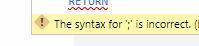
Still says ; is invalid to me. What's the difference of using a ' ; ' and a ' , ' ?
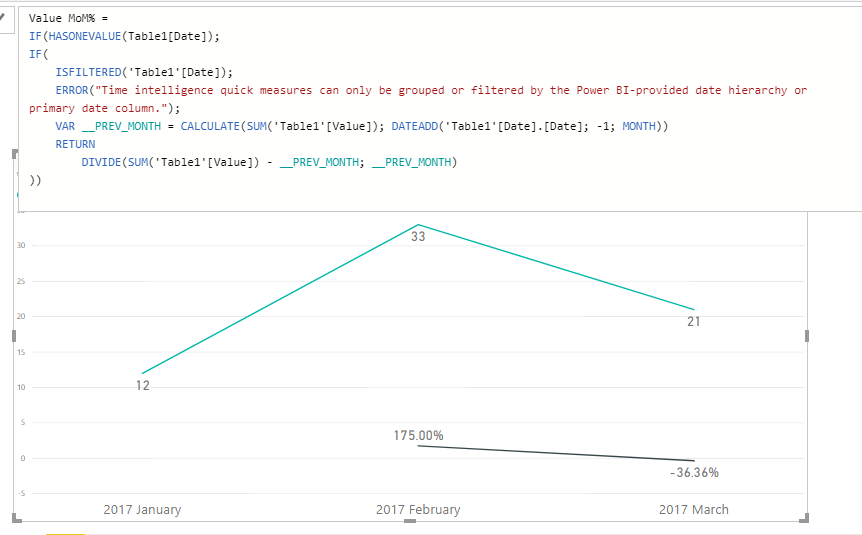
Can you also explain what does adding IF(HASONEVALUE()) does to the formula?
Thanks so much! : )
- Mark as New
- Bookmark
- Subscribe
- Mute
- Subscribe to RSS Feed
- Permalink
- Report Inappropriate Content
@Anonymous
The ; and , is just regional settings.
If you Formula works with , all should be with ,
HASONEVALUE evaluate in your scenario if you had a date in that context. In April you don't have dates so the result is blank and don't show in the visual.
Regards
Lima - Peru
- Mark as New
- Bookmark
- Subscribe
- Mute
- Subscribe to RSS Feed
- Permalink
- Report Inappropriate Content
Okay, I understand that part now. Thanks Victor! But the thing is the month on month change quick measure always gives the final row (the -100%). What should I do so that the last row will not end up showing in my chart? (Thanks for answering my endless questions 🙂 )

- Mark as New
- Bookmark
- Subscribe
- Mute
- Subscribe to RSS Feed
- Permalink
- Report Inappropriate Content
@Anonymous
I Answer in PM. The answer to avoid this is:
Cost MoM% =
IF(MAX('Table1'[Date_new])<>BLANK();
IF(
	ISFILTERED('Table1'[Date_new]);
	ERROR("Time intelligence quick measures can only be grouped or filtered by the Power BI-provided date hierarchy or primary date column.");
	VAR __PREV_MONTH =
		CALCULATE(
			SUM('Table1'[Cost]);
			DATEADD('Table1'[Date_new].[Date]; -1; MONTH)
		)
	RETURN
		DIVIDE(SUM('Table1'[Cost]) - __PREV_MONTH; __PREV_MONTH)
))
Lima - Peru
- Mark as New
- Bookmark
- Subscribe
- Mute
- Subscribe to RSS Feed
- Permalink
- Report Inappropriate Content
Helpful resources

Power BI Monthly Update - May 2026
Check out the May 2026 Power BI update to learn about new features.

Data Days 2026 coming soon!
Sign up to receive a private message when registration opens and key events begin.

New to Fabric Survey
If you have recently started exploring Fabric, we'd love to hear how it's going. Your feedback can help with product improvements.

Power BI DataViz World Championships - June 2026
A new Power BI DataViz World Championship is coming this June! Don't miss out on submitting your entry.

| User | Count |
|---|---|
| 24 | |
| 24 | |
| 21 | |
| 21 | |
| 18 |


| User | Count |
|---|---|
| 56 | |
| 52 | |
| 49 | |
| 26 | |
| 25 |


