cancel
Showing results for 
Search instead for 
Did you mean: 

Vote for your favorite vizzies from the Power BI Dataviz World Championship submissions. Vote now!

Reply
ashwinwullems
Frequent Visitor

Filter on filter problem

hello,


I am trying to make a benchmark for entities that exist in certain regions and provinces. a small data example is below.

I have made a measure to analyse the average score of the district that the entity is in. In below example the average outcome is 8.5 (over 4 entities) so entity 1 is doing well and entity 4 is not doing well. So far so good.


Now for the benchmark i want to compare the entities across the provinces, but the provinces I want to show in the map visual (which only takes province as the location) have to be only the provinces in the same district. (the real data has multiple districts) So for example if you choose entity 1 it will show 3 provinces (groningen, drenth and Gelderland and their averages (7, 9 and 11). 


I can make a the same summarized measure to calculate the average per Province, but i want to show only the provinces that arise in the corresponding district to the entity. I can do this by manually adding filters to the map visual, but i want it to be automised. Adjusting the filters so that only the entity filter adjusts the district and only the district adjusts the map also doesn't work, because it doens't auto update whenever you choose a new entity.


I hope my problem is clear, thanks in advance for the help


EntityDistrictProvinceScore
1Noord-OostGroningen7
2Noord-OostDrenthe9

3

Noord-OostDrenthe7

4

Noord-OostGelderland11

5

Zuid-OostLimburg10
1 ACCEPTED SOLUTION
v-yalanwu-msft
Community Support
Community Support

Hi, @ashwinwullems

Try ito create a new table from entity column  as slicer.

Entity = VALUES('Table'[Entity])


then create a measure.

Measure 2 = 
IF(ISFILTERED('Entity'[Entity]),
IF(MAX('Table'[District])= CALCULATE(MAX('Table'[District]),FILTER(ALL('Table'),[Entity]=MAX('Entity'[Entity]))),AVERAGE('Table'[Score])),AVERAGE('Table'[Score]))


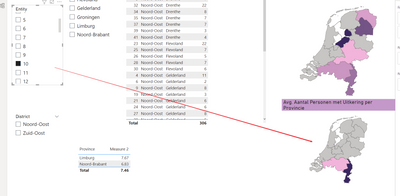
The final show:

vyalanwumsft_0-1657874372646.png


vyalanwumsft_0-1657874442571.png


Best Regards,
Community Support Team _ Yalan Wu
If this post helps, then please consider Accept it as the solution to help the other members find it more quickly.

View solution in original post

5 REPLIES 5
v-yalanwu-msft
Community Support
Community Support

Hi, @ashwinwullems

Try ito create a new table from entity column  as slicer.

Entity = VALUES('Table'[Entity])


then create a measure.

Measure 2 = 
IF(ISFILTERED('Entity'[Entity]),
IF(MAX('Table'[District])= CALCULATE(MAX('Table'[District]),FILTER(ALL('Table'),[Entity]=MAX('Entity'[Entity]))),AVERAGE('Table'[Score])),AVERAGE('Table'[Score]))


The final show:

vyalanwumsft_0-1657874372646.png


vyalanwumsft_0-1657874442571.png


Best Regards,
Community Support Team _ Yalan Wu
If this post helps, then please consider Accept it as the solution to help the other members find it more quickly.

This works perfectly. Thank you so much for your time

v-yalanwu-msft
Community Support
Community Support

Hi, @ashwinwullems ,

You could create a column or measure.

aver = CALCULATE(AVERAGE('Table'[Score]),ALLEXCEPT('Table','Table'[District]))

Or another measure.

aver2 = CALCULATE(AVERAGE('Table'[Score]),FILTER(ALLSELECTED('Table'),[District]=MAX('Table'[District])))

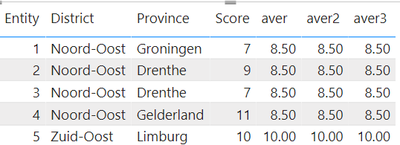
the final show:

vyalanwumsft_0-1657783105786.png


Best Regards,
Community Support Team _ Yalan Wu
If this post helps, then please consider Accept it as the solution to help the other members find it more quickly.

This is not quite the solution yet. I have attached a bigger sample set and illustration of my problem in an attached powerbi.

basically when you select entity 1 it shows the province on the map with the score of 7 (groningen is on the top right). If you don't select the entity it shows the average of groningen which is 6.6. In my own report i made the measure which shows the 6.6 whenever I select entity 1. That is not the problem.

What i want is that, based on the district that entity 1 is in (which you choose in the filter). The map is updated with the corresponding district. But automatically. So that it shows the 4 provinces and their average scores. The same result can be had by just using the noord-oost district filter in the report attached, but again. That is not automatic.

Powerbi file: 
https://www.dropbox.com/s/vhygud7mzdqzpd8/filter.pbix?dl=0

tamerj1
Community Champion
Community Champion

Hi @ashwinwullems 
Please provide a little larger sample data along with the expected results (a table will be just fine). Thank you

Helpful resources

Announcements
Power BI DataViz World Championships

Power BI Dataviz World Championships

Vote for your favorite vizzies from the Power BI World Championship submissions!

Sticker Challenge 2026 Carousel

Join our Community Sticker Challenge 2026

If you love stickers, then you will definitely want to check out our Community Sticker Challenge!

January Power BI Update Carousel

Power BI Monthly Update - January 2026

Check out the January 2026 Power BI update to learn about new features.

FabCon Atlanta 2026 carousel

FabCon Atlanta 2026

Join us at FabCon Atlanta, March 16-20, for the ultimate Fabric, Power BI, AI and SQL community-led event. Save $200 with code FABCOMM.