Join us in Barcelona for FabCon and SQLCon, September 28 - October 1, 2026.
This is best Fabric, Power BI, SQL and AI community event. How do we know? The last event sold out! Save €200 with code FABCMTY200.
Register now- Power BI forums
- Get Help with Power BI
- Desktop
- Service
- Report Server
- Power Query
- Mobile Apps
- Developer
- DAX Commands and Tips
- Custom Visuals Development Discussion
- Health and Life Sciences
- Power BI Spanish forums
- Translated Spanish Desktop
- Training and Consulting
- Instructor Led Training
- Dashboard in a Day for Women, by Women
- Galleries
- Data Stories Gallery
- Themes Gallery
- Contests Gallery
- QuickViz Gallery
- Quick Measures Gallery
- Visual Calculations Gallery
- Fabric Apps Gallery
- Notebook Gallery
- Translytical Task Flow Gallery
- TMDL Gallery
- R Script Showcase
- Webinars and Video Gallery
- Ideas
- Custom Visuals Ideas (read-only)
- Issues
- Issues
- Events
- Upcoming Events
July 28 - August 9 | Final Round of the Power BI Dataviz World Championships. This is your chance. Learn more
- Power BI forums
- Forums
- Get Help with Power BI
- Desktop
- Re: Filter multiple values from different columns
- Subscribe to RSS Feed
- Mark Topic as New
- Mark Topic as Read
- Float this Topic for Current User
- Bookmark
- Subscribe
- Printer Friendly Page

- Mark as New
- Bookmark
- Subscribe
- Mute
- Subscribe to RSS Feed
- Permalink
- Report Inappropriate Content
Filter multiple values from different columns
Hi,
I'm trying to filter my results where the value of column A is "yes" or the value of column B is "yes". Can someone help with the query?
Edit: It's a view back to a database and won't let me create a calculated column. Is there another way to do this?
Thanks
Solved! Go to Solution.

- Mark as New
- Bookmark
- Subscribe
- Mute
- Subscribe to RSS Feed
- Permalink
- Report Inappropriate Content
Hi @scottjl ,
This is the data I created:

Here are the steps you can follow:
1. Create measure.
Measure =
IF(
    MAX('Table'[priority])="Yes"||MAX('Table'[resources])="Yes",1,0)
Result:
Now it shows that all data exist. Measure marks the unqualified data as 0 and the qualified data as 1

2. Put measure into filter, set is = 1, and apply filter

3. Result:
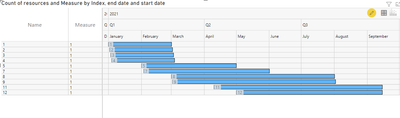
Display the data that meet the requirements:
Best Regards,
Liu Yang
If this post helps, then please consider Accept it as the solution to help the other members find it more quickly.
- Mark as New
- Bookmark
- Subscribe
- Mute
- Subscribe to RSS Feed
- Permalink
- Report Inappropriate Content
Hi @scottjl ,
This is the data I created:
Here are the steps you can follow:
1. Create measure.
Measure =
IF(
    MAX('Table'[priority])="Yes"||MAX('Table'[resources])="Yes",1,0)
Result:
Now it shows that all data exist. Measure marks the unqualified data as 0 and the qualified data as 1
2. Put measure into filter, set is = 1, and apply filter
3. Result:
Display the data that meet the requirements:
Best Regards,
Liu Yang
If this post helps, then please consider Accept it as the solution to help the other members find it more quickly.


- Mark as New
- Bookmark
- Subscribe
- Mute
- Subscribe to RSS Feed
- Permalink
- Report Inappropriate Content
@scottjl
You can apply a filter as follows
FILTER (
   TABLE,
   TABLE[COLUMN A] = "YES" ||  TABLE[COLUMN B] = "YES"
)
⭕ Subscribe and learn Power BI from these videos
⚪ Website ⚪ LinkedIn ⚪ PBI User Group
- Mark as New
- Bookmark
- Subscribe
- Mute
- Subscribe to RSS Feed
- Permalink
- Report Inappropriate Content
Sorry, newbie question, where do I go in desktop to apply that filter?
- Mark as New
- Bookmark
- Subscribe
- Mute
- Subscribe to RSS Feed
- Permalink
- Report Inappropriate Content
@scottjl
Can you explain what you are trying to acheive? Do you need a table as output or need to apply filtering inside a measure? Better provide some sample data and the expected results.
⭕ Subscribe and learn Power BI from these videos
⚪ Website ⚪ LinkedIn ⚪ PBI User Group
- Mark as New
- Bookmark
- Subscribe
- Mute
- Subscribe to RSS Feed
- Permalink
- Report Inappropriate Content
Sure. I have a gantt chart showing upcoming business opportunities that have a start and end date. The opportunity records in dynamics are all tagged priority "yes" or "no" and provide resources "yes" or "no". I want to only show the opportunities that are tagged priority "yes" or provide resources "yes". Priority and provide resources are 2 different columns in the table.
- Mark as New
- Bookmark
- Subscribe
- Mute
- Subscribe to RSS Feed
- Permalink
- Report Inappropriate Content
@scottjl
Basically, you will be having a measure to calculate a result that probably is used for conditional formatting based on the conditions you specified. you can incorporate the filter that I provided to apply the filter within your measure.
⭕ Subscribe and learn Power BI from these videos
⚪ Website ⚪ LinkedIn ⚪ PBI User Group
- Mark as New
- Bookmark
- Subscribe
- Mute
- Subscribe to RSS Feed
- Permalink
- Report Inappropriate Content
This is not possible from the filter pane. You might want to create a calculated column as OR([Column A]="yes",[Column B]="yes") and then filter on the calculated column


- Mark as New
- Bookmark
- Subscribe
- Mute
- Subscribe to RSS Feed
- Permalink
- Report Inappropriate Content
Add a custom column with this expression and then filter the new column on "Y"
if [Column A] = "yes" or [Column B] = "yes" then "Y" else "N"
Pat
Did I answer your question? Mark my post as a solution! Kudos are also appreciated!
To learn more about Power BI, follow me on Twitter or subscribe on YouTube.
@mahoneypa HoosierBI on YouTube
- Mark as New
- Bookmark
- Subscribe
- Mute
- Subscribe to RSS Feed
- Permalink
- Report Inappropriate Content
Thanks Pat. It's a live database view so it won't let me add a new column. Can i do it with a measure?
Helpful resources

FabCon & SQLCon – Barcelona 2026
Join us in Barcelona for FabCon and SQLCon, the Fabric, Power BI, SQL, and AI community event. Save €200 with code FABCMTY200.

Fabric Community Sticker Challenge - Barcelona 2026
If you love stickers, then you will definitely want to check out our community sticker challenge, Barcelona edition!

Power BI Monthly Update - July 2026
Check out the July 2026 Power BI update to learn about new features.

Power BI DataViz World Championships - June 2026
A new Power BI DataViz World Championship is coming this June! Don't miss out on submitting your entry.

| User | Count |
|---|---|
| 25 | |
| 23 | |
| 19 | |
| 17 | |
| 14 |


| User | Count |
|---|---|
| 25 | |
| 23 | |
| 20 | |
| 20 | |
| 19 |


