Join us in Barcelona for FabCon and SQLCon, September 28 - October 1, 2026.
This is best Fabric, Power BI, SQL and AI community event. How do we know? The last event sold out! Save €200 with code FABCMTY200.
Register now- Power BI forums
- Get Help with Power BI
- Desktop
- Service
- Report Server
- Power Query
- Mobile Apps
- Developer
- DAX Commands and Tips
- Custom Visuals Development Discussion
- Health and Life Sciences
- Power BI Spanish forums
- Translated Spanish Desktop
- Training and Consulting
- Instructor Led Training
- Dashboard in a Day for Women, by Women
- Galleries
- Data Stories Gallery
- Themes Gallery
- Contests Gallery
- QuickViz Gallery
- Quick Measures Gallery
- Visual Calculations Gallery
- Fabric Apps Gallery
- Notebook Gallery
- Translytical Task Flow Gallery
- TMDL Gallery
- R Script Showcase
- Webinars and Video Gallery
- Ideas
- Custom Visuals Ideas (read-only)
- Issues
- Issues
- Events
- Upcoming Events
The Fabric community is now in read-only for platform upgrade. Learn more
- Power BI forums
- Forums
- Get Help with Power BI
- Desktop
- Filter matrix for negative values
- Subscribe to RSS Feed
- Mark Topic as New
- Mark Topic as Read
- Float this Topic for Current User
- Bookmark
- Subscribe
- Printer Friendly Page


- Mark as New
- Bookmark
- Subscribe
- Mute
- Subscribe to RSS Feed
- Permalink
Filter matrix for negative values
Hello,
I want to apply a measure filter to a matrix visual after the calculation has taken place instead of before.
In the screenshot below I only want to see the information for Part number DEF.
Current:
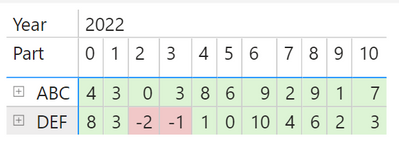
Desired:
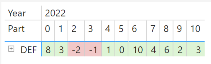
Because of the extra details at the row level, shown below -
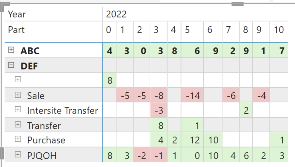
- applying a simple '<0' filter will not give result I'm looking for, because it will filter for <0 at the lowest level of the row hierarchy and then calculate, instead of filtering only after the calculation is complete.
A note, just in case it matters: when the matrix is collapsed, it displays the evaluation for "PJQOH", which is a running total of the rows above PJQOH (PJQOH means 'projected quantity on hand'). This custom display is achieved using IF( HASONEVALUE ( <column> ) ).
I hope this is enough information. Other answers have made me understand what is going wrong, but I've not been able to apply their solutions to this situation.
Link to file: https://drive.google.com/file/d/1JzT1Cwqh5anJ_A6dvVuWdGGpz73qj3Mt/view?usp=sharing
Solved! Go to Solution.


- Mark as New
- Bookmark
- Subscribe
- Mute
- Subscribe to RSS Feed
- Permalink
Hi @DCELL ,
You can try the following formula:
Filter_Consolidate =
VAR temp_table =
    CALCULATETABLE (
        FILTER (
            ADDCOLUMNS (
                SUMMARIZE ( DemandSupply, DemandSupply[Part], Cal[Fiscal Year], Cal[rDate] ),
                "_Consolidated", [Consolidated Planning Data]
            ),
            [_Consolidated] < 0
        ),
        ALL ( Cal ),
        ALLEXCEPT ( DemandSupply, DemandSupply[Part] )
    )
RETURN
    COUNTROWS ( temp_table )
Has you can see below is only presenting one row:
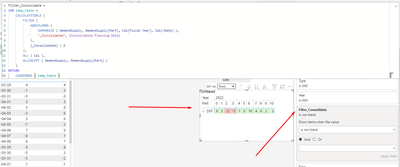
Regards
Miguel Félix
Did I answer your question? Mark my post as a solution!
Proud to be a Super User!
Check out my blog: Power BI em Português

- Mark as New
- Bookmark
- Subscribe
- Mute
- Subscribe to RSS Feed
- Permalink
Try:
filter < 0 =
COUNTROWS(
CALCULATETABLE(VALUES(Table[Part]), FILTER(VALUES(Table[Part]), [your measure] < 0)))
Add this measure to the filter pane and set the value to = 1
Did I answer your question? Mark my post as a solution!
In doing so, you are also helping me. Thank you!
Proud to be a Super User!
Paul on Linkedin.
- Mark as New
- Bookmark
- Subscribe
- Mute
- Subscribe to RSS Feed
- Permalink
Hi @PaulDBrown ,
This does not work either.
I think I need to share the file, here is a link:
https://drive.google.com/file/d/1JzT1Cwqh5anJ_A6dvVuWdGGpz73qj3Mt/view?usp=sharing
- Mark as New
- Bookmark
- Subscribe
- Mute
- Subscribe to RSS Feed
- Permalink
Hi @DCELL ,
On the filter pane on the matrix select the measure and then select all the values below 0. Should return correct value has you need.
Regards
Miguel Félix
Did I answer your question? Mark my post as a solution!
Proud to be a Super User!
Check out my blog: Power BI em Português- Mark as New
- Bookmark
- Subscribe
- Mute
- Subscribe to RSS Feed
- Permalink
Hi @MFelix ,
This is what I was trying to explain with
"applying a simple '<0' filter will not give result I'm looking for, because it will filter for <0 at the lowest level of the row hierarchy and then calculate, instead of filtering only after the calculation is complete."
This is the result when filtering the measure for < 0 in the filter pane:

The default behavior, as I understand it, is:
1) Filter
2) Evaluate
But I need
1) Evaluate
2) Filter the result of the evaluation for <0 at the top level of the row hierarchy
This is what I'm looking for:

- Mark as New
- Bookmark
- Subscribe
- Mute
- Subscribe to RSS Feed
- Permalink
Hi @DCELL ,
To understand you want to have the lines that have a negative value in any column is that it?
Because looking at the values you are presenting how do I know that the DEF should be present is because those two values are negative?
Can you please share a mockup data or sample of your PBIX file. You can use a onedrive, google drive, we transfer or similar link to upload your files.
If the information is sensitive please share it trough private message.
Regards
Miguel Félix
Did I answer your question? Mark my post as a solution!
Proud to be a Super User!
Check out my blog: Power BI em Português- Mark as New
- Bookmark
- Subscribe
- Mute
- Subscribe to RSS Feed
- Permalink
@MFelix,
In simple terms, I need Power BI to "Show me parts that will have a projected quantity on hand less than zero at any point in time."
I edited my original post and pasted a link at the end.
Thanks!!
- Mark as New
- Bookmark
- Subscribe
- Mute
- Subscribe to RSS Feed
- Permalink
Hi @DCELL ,
You can try the following formula:
Filter_Consolidate =
VAR temp_table =
    CALCULATETABLE (
        FILTER (
            ADDCOLUMNS (
                SUMMARIZE ( DemandSupply, DemandSupply[Part], Cal[Fiscal Year], Cal[rDate] ),
                "_Consolidated", [Consolidated Planning Data]
            ),
            [_Consolidated] < 0
        ),
        ALL ( Cal ),
        ALLEXCEPT ( DemandSupply, DemandSupply[Part] )
    )
RETURN
    COUNTROWS ( temp_table )
Has you can see below is only presenting one row:
Regards
Miguel Félix
Did I answer your question? Mark my post as a solution!
Proud to be a Super User!
Check out my blog: Power BI em Português
Helpful resources

FabCon & SQLCon – Barcelona 2026
Join us in Barcelona for FabCon and SQLCon, the Fabric, Power BI, SQL, and AI community event. Save €200 with code FABCMTY200.

Power BI DataViz World Championships - June 2026
A new Power BI DataViz World Championship is coming this June! Don't miss out on submitting your entry.

| User | Count |
|---|---|
| 20 | |
| 18 | |
| 14 | |
| 13 | |
| 13 |


| User | Count |
|---|---|
| 48 | |
| 35 | |
| 24 | |
| 20 | |
| 19 |


