cancel
Showing results for 
Search instead for 
Did you mean: 

Next up in the FabCon + SQLCon recap series: The roadmap for Microsoft SQL and Maximizing Developer experiences in Fabric. All sessions are available on-demand after the live show. Register now

Reply
Anonymous
Not applicable

Filter by month number for all tables

Hello to power bi community. I am newbie and I want your advice about something.

I have tables that works only with number of month. I want to create a month table so to be able to filter by month.

Let me give you an example:

I have 3 tables: CustomerTransactions, SupplierTransaction, PersonalTransactions

They look like :

MonthCustomerIDItemIDSalesManIDValue
112011120
212012100
112121130


SupplierTransactions:

MonthSupplierIDItemIDSalesManIDValue
11011120
11112100
21121130


PersonalTransactions:

MonthEmployeeIDItemIDValue
1101120
1111100
2112130


What I want is to create a month table that 1: they will give me back the name of the month 2: They will filter other tables based on selected month on the slicer.

I have create a table with the months numbers and name but when I am trying to connect two tables with the month table, it is says that this relationship will be inactive since it will create a conflict between an another table and Month.

Month table looks like:

MonthIDMonthName
1January
2February


How can I overcome this?  

2 ACCEPTED SOLUTIONS
SolomonovAnton
Super User
Super User

hello

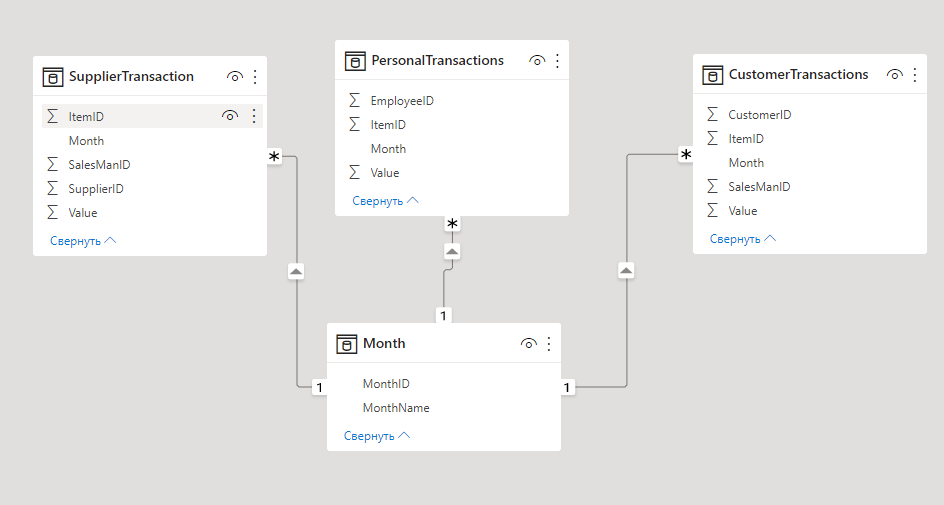
create a relationship like in the picture below

SolomonovAnton_0-1657707237487.png

SolomonovAnton_1-1657707321804.png


View solution in original post

v-yanjiang-msft
Community Support
Community Support

Hi @Anonymous ,

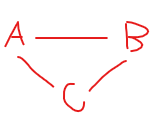
According to the error message, I think it's caused by ambiguity relationship, it means for example SupplierTransactions have two path to reach PersonalTransactions, you have to choose only. Additonally, you can't create closed loop relationship, it means for three tables, you can't make three active relationships between each other like below.

vkalyjmsft_0-1658139776014.png

Check whether the relationship of the three tables conforms to the situation I described above, then if you can't solve it by modify the relationship, please indicate their relationship here.


Best Regards,
Community Support Team _ kalyj

If this post helps, then please considerAccept it as the solution to help the other members find it more quickly.


View solution in original post

3 REPLIES 3
v-yanjiang-msft
Community Support
Community Support

Hi @Anonymous ,

Is your problem solved?? If so, Would you mind accept the helpful replies as solutions? Then we are able to close the thread. More people who have the same requirement will find the solution quickly and benefit here. Thank you.

Best Regards,
Community Support Team _ kalyj

v-yanjiang-msft
Community Support
Community Support

Hi @Anonymous ,

According to the error message, I think it's caused by ambiguity relationship, it means for example SupplierTransactions have two path to reach PersonalTransactions, you have to choose only. Additonally, you can't create closed loop relationship, it means for three tables, you can't make three active relationships between each other like below.

vkalyjmsft_0-1658139776014.png

Check whether the relationship of the three tables conforms to the situation I described above, then if you can't solve it by modify the relationship, please indicate their relationship here.


Best Regards,
Community Support Team _ kalyj

If this post helps, then please considerAccept it as the solution to help the other members find it more quickly.


SolomonovAnton
Super User
Super User

hello

create a relationship like in the picture below

SolomonovAnton_0-1657707237487.png

SolomonovAnton_1-1657707321804.png


Helpful resources

Announcements
New to Fabric survey Carousel

New to Fabric Survey

If you have recently started exploring Fabric, we'd love to hear how it's going. Your feedback can help with product improvements.

Power BI DataViz World Championships carousel

Power BI DataViz World Championships - June 2026

A new Power BI DataViz World Championship is coming this June! Don't miss out on submitting your entry.

Join our Fabric User Panel

Join our Fabric User Panel

Share feedback directly with Fabric product managers, participate in targeted research studies and influence the Fabric roadmap.

March Power BI Update Carousel

Power BI Community Update - March 2026

Check out the March 2026 Power BI update to learn about new features.