This time we’re going bigger than ever. Fabric, Power BI, SQL, AI and more. We're covering it all. You won't want to miss it.
Learn moreLevel up your Power BI skills this month - build one visual each week and tell better stories with data! Get started
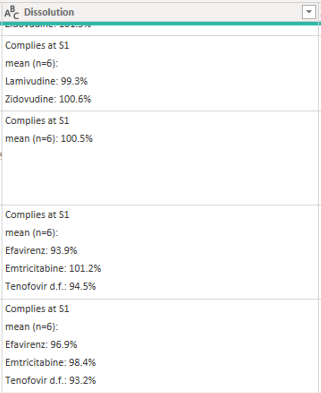
I have an attribute (column) called "Dissolution" from a table in Power BI which is a string with values in the string. I want to extract the values as new attributes (columns). The sample column is as follows:
The expected new columns are as follows:
| Column 1 | Column 2 | Column 3 |
| 99.93% | 100.6% | |
| 100.5% | ||
| 93.9% | 101.2% | 94.5% |
| 96.9% | 98.4% | 93.2% |
Thanking you and best regards,
Chris
Solved! Go to Solution.
@Chitemerere - That's pretty ugly but I believe these will work:
Column 1 =
VAR __Pos = SEARCH("%",[Dissolution],,-1)
VAR __Col = IF(__Pos=-1,-1,SEARCH(":",[Dissolution],__Pos - 8,-1))
RETURN
IF(__Pos = -1 || __Col = -1,BLANK(),MID([Dissolution],__Col+2, __Pos-__Col-1))
Column 2 =
VAR __Pos1 = SEARCH("%",[Dissolution],,-1)
VAR __Pos = SEARCH("%",[Dissolution],__Pos1 + 1,-1)
VAR __Col = IF(__Pos=-1,-1,SEARCH(":",[Dissolution],__Pos - 8,-1))
RETURN
IF(__Pos = -1 || __Col = -1,BLANK(),MID([Dissolution],__Col+2, __Pos-__Col-1))
Column 3 =
VAR __Pos1 = SEARCH("%",[Dissolution],,-1)
VAR __Pos2 = SEARCH("%",[Dissolution],__Pos1 + 1,-1)
VAR __Pos = IF(__Pos2 = -1,-1,SEARCH("%",[Dissolution],__Pos2 + 1,-1))
VAR __Col = IF(__Pos=-1,-1,SEARCH(":",[Dissolution],__Pos - 8,-1))
RETURN
IF(__Pos = -1 || __Col = -1,BLANK(),MID([Dissolution],__Col+2, __Pos-__Col-1))
@Chitemerere - That's pretty ugly but I believe these will work:
Column 1 =
VAR __Pos = SEARCH("%",[Dissolution],,-1)
VAR __Col = IF(__Pos=-1,-1,SEARCH(":",[Dissolution],__Pos - 8,-1))
RETURN
IF(__Pos = -1 || __Col = -1,BLANK(),MID([Dissolution],__Col+2, __Pos-__Col-1))
Column 2 =
VAR __Pos1 = SEARCH("%",[Dissolution],,-1)
VAR __Pos = SEARCH("%",[Dissolution],__Pos1 + 1,-1)
VAR __Col = IF(__Pos=-1,-1,SEARCH(":",[Dissolution],__Pos - 8,-1))
RETURN
IF(__Pos = -1 || __Col = -1,BLANK(),MID([Dissolution],__Col+2, __Pos-__Col-1))
Column 3 =
VAR __Pos1 = SEARCH("%",[Dissolution],,-1)
VAR __Pos2 = SEARCH("%",[Dissolution],__Pos1 + 1,-1)
VAR __Pos = IF(__Pos2 = -1,-1,SEARCH("%",[Dissolution],__Pos2 + 1,-1))
VAR __Col = IF(__Pos=-1,-1,SEARCH(":",[Dissolution],__Pos - 8,-1))
RETURN
IF(__Pos = -1 || __Col = -1,BLANK(),MID([Dissolution],__Col+2, __Pos-__Col-1))
Thank you very much for your assistance, most appreciated. It is the right direction but the results are not as expected. Please find below actual results and expected results.
Dissolution | Column 1 (Actual) | Expected 1 | Column 2 (Actual) | Expected 2 | Column 3 (Actual) | Expected 3 |
Complies at S1
mean (n=6):
Lamivudine: 99.8%
Zidovudine: 101.0% | 100.00% | 99.80% |
| 101.00% |
|
|
Complies at S1
mean (n=6):
Nevirapine: 98.3% | 98.70% | 98.30% | 100.10% |
|
|
|
Complies at S1
mean (n=6):
Nevirapine: 100.2% | 101.00% | 100.20% | 102.70% |
|
|
|
Complies at S1
mean (n=6):
Nevirapine: 101.5% | 100.70% | 101.50% | 100.70% |
|
|
|
Complies at S1
mean (n=6):
Nevirapine: 100.5% | 98.30% | 100.50% | 98.00% |
|
|
|
Complies at S1
mean (n=6):
Lamivudine: 96.0%
Zidovudine: 95.3% | 97.40% | 96.00% | 98.20% | 95.30% |
|
|
Complies at S1
mean (n=6):
Nevirapine: 100.2% | 91.20% | 100.20% |
|
|
|
|
Complies at S1
mean (n=6):
Efavirenz: 98.7%
Emtricitabine: 100.5%
Tenofovir d.f.: 97.5% | 95.30% | 98.70% | 94.90% | 100.50% |
| 97.50% |
Complies at S1
mean (n=6):
Nevirapine: 98.0% | 93.70% | 98.00% | 94.70% |
|
|
|
Complies at S1
mean (n=6):
Efavirenz: 90.0%
Emtricitabine: 98.8%
Tenofovir d.f.: 92.5% | 97.30% | 90.00% | 98.80% | 98.80% |
| 92.50% |
Complies at S1
mean (n=6): 90.4% | 103.20% | 90.40% |
|
|
|
|
Complies at S1
mean (n=6): 101.5% | 111.10% | 101.50% |
|
|
|
|
Complies at S1
mean (n=6):
Nevirapine: 99.5% | 98.60% | 99.50% | 99.00% |
|
|
|
Complies at S1
mean (n=6):
Nevirapine: 98.8% | 101.40% | 98.80% | 101.10% |
|
|
|
Complies at S1
mean (n=6): 111.1% | 89.20% | 111.10% | 88.30% |
|
|
|
Complies at S1
mean (n=6): 103.2% | 91.20% | 103.20% |
|
|
|
|
Complies at S1
mean (n=6): 97.3% | 99.30% | 97.30% | 100.60% |
|
|
|
Complies at S1
mean (n=6):
Lamivudine: 93.7%
Zidovudine: 94.7% | 101.40% | 93.70% | 101.50% | 94.70% |
|
|
Complies at S1
mean (n=6):
Lamivudine: 95.3%
Zidovudine: 94.9% | 101.30% | 95.30% | 101.10% | 94.90% |
|
|
Complies at S1
mean (n=6): 91.2% | 92.50% | 91.20% |
|
|
|
|
Complies at S1
mean (n=6):
Lamivudine: 97.4%
Zidovudine: 98.2% | 104.00% | 97.40% |
| 98.20% |
|
|
Complies at S1
mean (n=6):
Lamivudine: 98.3%
Zidovudine: 98.0% | 101.00% | 98.30% | 102.00% | 98.00% |
|
|
Complies at S1
mean (n=6):
Lamivudine: 100.7%
Zidovudine: 100.7% | 99.10% | 100.70% | 101.00% | 100.70% |
|
|
Complies at S1
mean (n=6):
Lamivudine: 101.0%
Zidovudine: 102.7% | 100.20% | 101.00% | 101.40% | 102.70% |
|
|
Complies at S1
mean (n=6):
Lamivudine: 95.2%
Zidovudine: 103.6% | 100.30% | 95.20% | 100.30% | 103.60% |
|
|
Complies at S1
mean (n=6):
Lamivudine: 96.3%
Zidovudine: 100.5% | 98.70% | 96.30% | 101.20% | 100.50% |
|
|
Complies at S1
mean (n=6):
Lamivudine: 96.8%
Zidovudine: 102.7% | 96.70% | 96.80% |
| 102.70% |
|
|
Complies at S1
mean (n=6):
Lamivudine: 99.8%
Zidovudine: 101.4% | 97.70% | 99.80% |
| 101.40% |
|
|
Complies at S1
mean (n=6):
Lamivudine: 100.1%
Zidovudine: 101.5% | 96.90% | 100.10% | 98.60% | 101.50% | 98.40% |
|
Complies at S1
mean (n=6):
Lamivudine: 99.2%
Zidovudine: 100.8% | 96.20% | 99.20% | 99.70% | 100.80% | 97.90% |
|
Best regards,
Chris
@Chitemerere - It's hard to say, it looks like it is inventing numbers that aren't actually in the row/column so no idea how that could be happening. You are implementing this as a column, correct? Not a measure?
Like your first row,
Complies at S1
mean (n=6):
Lamivudine: 99.8%
Zidovudine: 101.0%
I don't see where the calculation could possibly get 100.00% That does not even seem possible to me because that number isn't even in the text anywhere. I'm attaching my working PBIX. You want Table (2). It is based on your original sample data.
Many thanks, managed to resolve the problem.
Regards,
Chris
Check out the April 2026 Power BI update to learn about new features.
Sign up to receive a private message when registration opens and key events begin.
If you have recently started exploring Fabric, we'd love to hear how it's going. Your feedback can help with product improvements.
| User | Count |
|---|---|
| 36 | |
| 33 | |
| 31 | |
| 24 | |
| 18 |
| User | Count |
|---|---|
| 68 | |
| 50 | |
| 33 | |
| 24 | |
| 24 |