This time we’re going bigger than ever. Fabric, Power BI, SQL, AI and more. We're covering it all. You won't want to miss it.
Learn moreDid you hear? There's a new SQL AI Developer certification (DP-800). Start preparing now and be one of the first to get certified. Register now
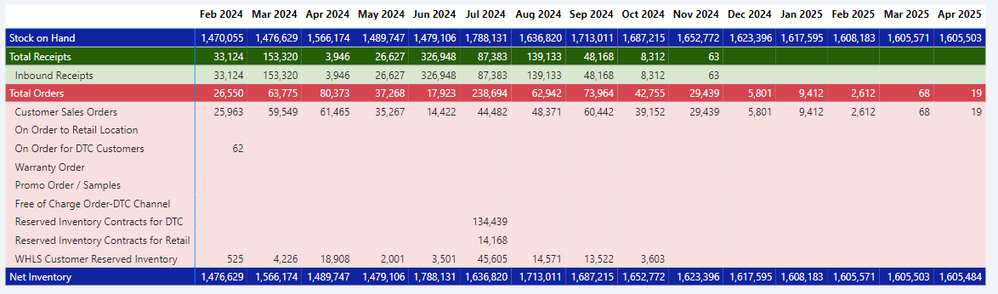
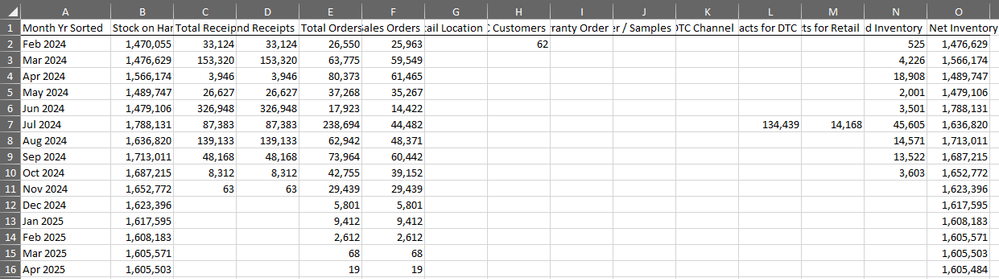
I have a matrix in a Power BI report, shown below, where values are in rows and months are in columns. I want this to export to Excel in the Exact same format, with values on rows and months on columns. However, when I export to .xlsx, either Data with Current Layout or Summarized data, the Excel report is produced with values on columns and months on rows (see second screenshot below). How can this be adjusted so I can export the file with values on rows? Thank you
@Anonymous did you find any solution to that problem?
You can correct this by not exporting. Instead, use Analyze in Excel or "Excel with Live Connection" and then recreate the desired format in Excel.
Thank you for the reply. This is a report a bunch of business users will be referencing, so I'd rather not have them need to reformat. Do you know of another matrix visual that allows for formatted exports?
Consider using Paginated Reports. Fair warning: steep learning curve.
Check out the April 2026 Power BI update to learn about new features.
Sign up to receive a private message when registration opens and key events begin.
If you have recently started exploring Fabric, we'd love to hear how it's going. Your feedback can help with product improvements.
| User | Count |
|---|---|
| 34 | |
| 31 | |
| 25 | |
| 20 | |
| 16 |
| User | Count |
|---|---|
| 60 | |
| 48 | |
| 29 | |
| 23 | |
| 23 |