This is best Fabric, Power BI, SQL and AI community event. How do we know? The last event sold out! Save €200 with code FABCMTY200.
Register nowA new Data Days event is coming soon! This time we’re going bigger than ever. Fabric, Power BI, SQL, AI and more. Don't miss out.
Dear all,
I have a little problem on Power Query,
In fact, I integrated TABLE1 from an Excel file and in Power BI and I want to transform the table and explode it according to the number of days off (by modifying the date each time of END) as shown below.
there is any solution to do it in Power Query PBI?
Solved! Go to Solution.
Hi @Anonymous
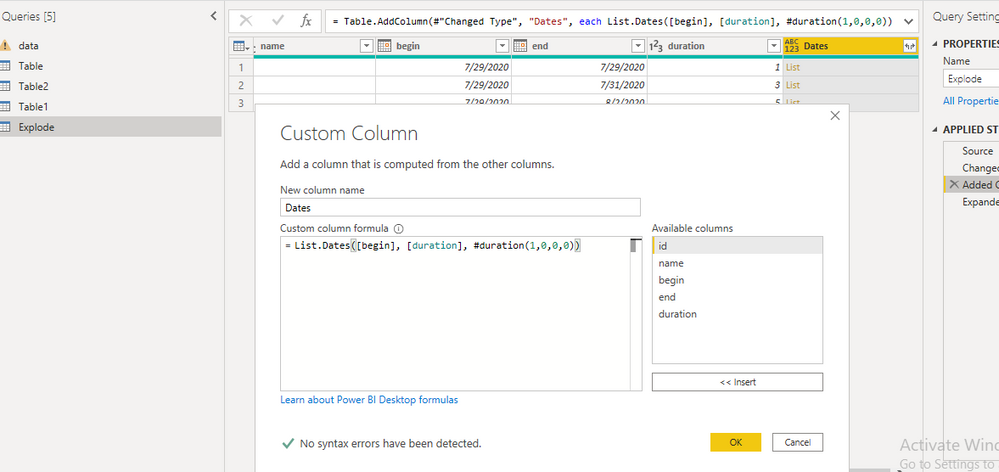
Create a Custom Column as shown below.
After creating above column expand the rows and apply necessary transformations.
Hope this helps.
Please mark as a solution if serves right.
Thanks
Hi @Anonymous
Create a Custom Column as shown below.
After creating above column expand the rows and apply necessary transformations.
Hope this helps.
Please mark as a solution if serves right.
Thanks
@Anonymous thank you 🙂
@Anonymous , Try like
Group by all other than end date. Take max of end Date
Sign up to receive a private message when registration opens and key events begin.
If you have recently started exploring Fabric, we'd love to hear how it's going. Your feedback can help with product improvements.
| User | Count |
|---|---|
| 33 | |
| 25 | |
| 23 | |
| 20 | |
| 15 |
| User | Count |
|---|---|
| 64 | |
| 41 | |
| 27 | |
| 22 | |
| 22 |