Join us at FabCon Atlanta from March 16 - 20, 2026, for the ultimate Fabric, Power BI, AI and SQL community-led event. Save $200 with code FABCOMM.
Register now!The Power BI Data Visualization World Championships is back! Get ahead of the game and start preparing now! Learn more
I am trying to create a measure that calculates the Sum of all spend for Type A while excluding Accounts 9,10,11. Can anyone help me with this?
| Type | Spend | Account |
| A | 20,000,000 | 1 |
| A | 20,000,000 | 2 |
| A | 20,000,000 | 3 |
| A | 20,000,000 | 4 |
| A | 20,000,000 | 5 |
| A | 50,000,000 | 6 |
| A | 10,000,000 | 7 |
| A | 10,000,000 | 8 |
| A | 50,000,000 | 9 |
| A | 50,000,000 | 10 |
| A | 50,000,000 | 11 |
| B | 10,000,000 | 3 |
| B | 10,000,000 | 3 |
Solved! Go to Solution.
You can use a measure expression like this
NewMeasure = CALCULATE(SUM(Table[Spend]), NOT(Table[Account] IN {9,10,11}))
If Account is a text column, put each value in double quotes.
Regards,
Pat
To learn more about Power BI, follow me on Twitter or subscribe on YouTube.
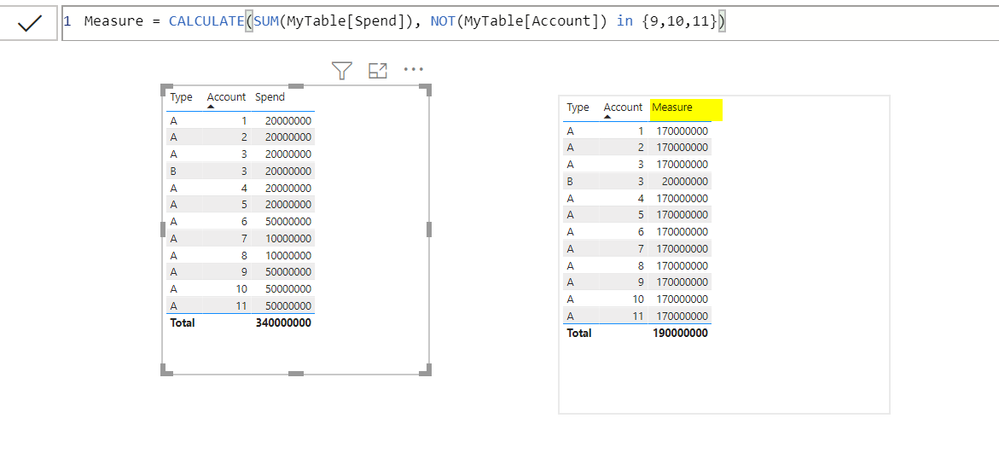
@dw700d , Please refer my below screen shot:
You can use a measure expression like this
NewMeasure = CALCULATE(SUM(Table[Spend]), NOT(Table[Account] IN {9,10,11}))
If Account is a text column, put each value in double quotes.
Regards,
Pat
To learn more about Power BI, follow me on Twitter or subscribe on YouTube.
The Power BI Data Visualization World Championships is back! Get ahead of the game and start preparing now!
| User | Count |
|---|---|
| 39 | |
| 37 | |
| 33 | |
| 32 | |
| 29 |
| User | Count |
|---|---|
| 133 | |
| 88 | |
| 85 | |
| 68 | |
| 64 |