Don't miss your chance to take the Fabric Data Engineer (DP-700) exam on us!
Learn moreWe've captured the moments from FabCon & SQLCon that everyone is talking about, and we are bringing them to the community, live and on-demand. Starts on April 14th. Register now
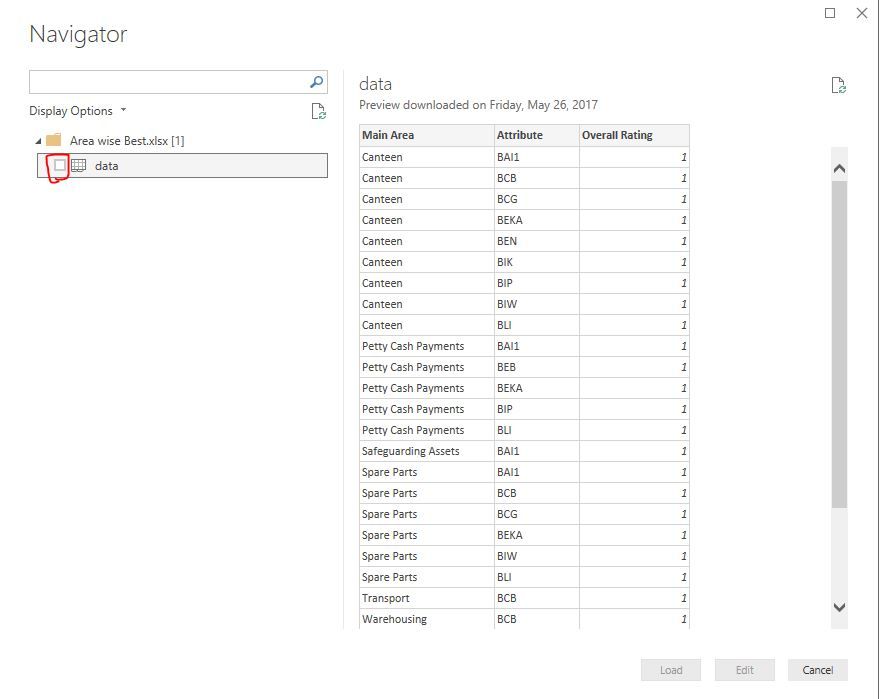
I can select an Excel Workbook. I can select a worksheet and I see the table in the pane. However, the load button remains gray. This started happing today.
Been using the Power BI for weeks and everything was working.
Even the tables that did work do not work now.
I even went as for to uninstall Power BI and reinstall.
Any help greatly appreciated.
Gary
Solved! Go to Solution.
Above tick box is missing on your Power BI desktop or is it still there? If it's there try to update it to latest version and see.
I did not see the checkbox to the left of the spreadsheet file. I clicked the checkbox, and everything is working.
Thanks so much I was losing my mind.
Gary
If you have recently started exploring Fabric, we'd love to hear how it's going. Your feedback can help with product improvements.
A new Power BI DataViz World Championship is coming this June! Don't miss out on submitting your entry.
Share feedback directly with Fabric product managers, participate in targeted research studies and influence the Fabric roadmap.
| User | Count |
|---|---|
| 51 | |
| 37 | |
| 35 | |
| 19 | |
| 17 |
| User | Count |
|---|---|
| 70 | |
| 64 | |
| 39 | |
| 33 | |
| 23 |