cancel
Showing results for 
Search instead for 
Did you mean: 

July 7 - July 17 | Round 2 of the Power BI Dataviz World Championships. Don't miss your chance! Learn more

Reply
Gary1
Frequent Visitor

Excel Load

I can select an Excel  Workbook. I can select a worksheet and I see the table in the pane. However, the load button remains gray. This started happing today.


Been using the Power BI for weeks and everything was working.


Even the tables that did work do not work now.


I even went as for to uninstall Power BI and reinstall.


Any help greatly appreciated.


Gary

1 ACCEPTED SOLUTION
dilumd
Impactful Individual

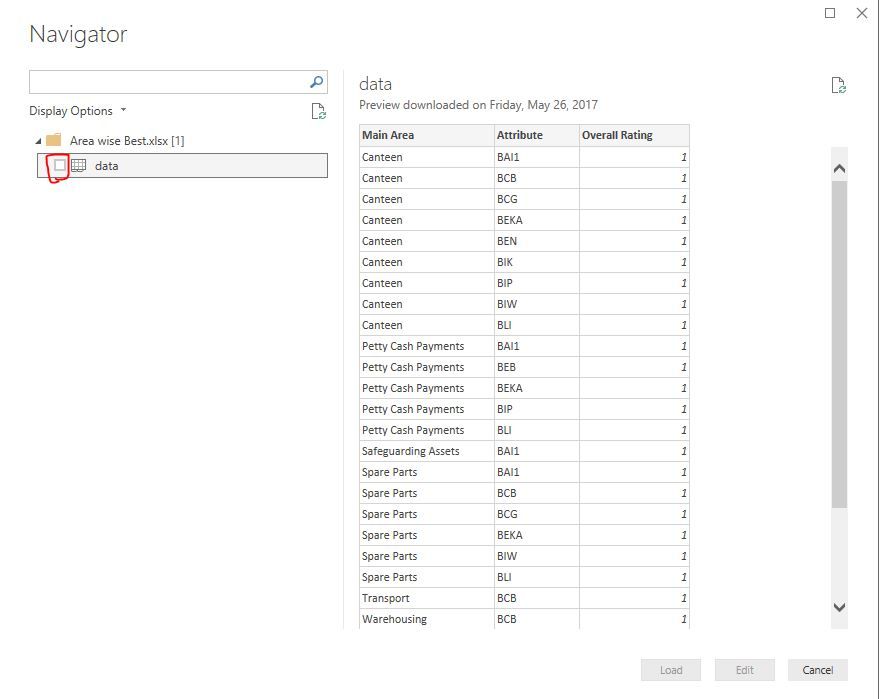
Capture.JPGAbove tick box is missing on your Power BI desktop or is it still there? If it's there try to update it to latest version and see.


View solution in original post

2 REPLIES 2
dilumd
Impactful Individual

Capture.JPGAbove tick box is missing on your Power BI desktop or is it still there? If it's there try to update it to latest version and see.


Gary1
Frequent Visitor

I did not see the checkbox to the left of the spreadsheet file. I clicked the checkbox, and everything is working.


Thanks so much I was losing my mind.


Gary 

Helpful resources

Announcements
FabCon and SQLCon Barcelona 2026

FabCon & SQLCon – Barcelona 2026

Join us in Barcelona for FabCon and SQLCon, the Fabric, Power BI, SQL, and AI community event. Save €200 with code FABCMTY200.

60 days of Data Days Carousel

Data Days 2026

Join Data Days 2026: 60 days of free live/on-demand sessions, challenges, study groups, and certification opportunities.

Power BI DataViz World Championships carousel

Power BI DataViz World Championships - June 2026

A new Power BI DataViz World Championship is coming this June! Don't miss out on submitting your entry.

Top Solution Authors