Join us at FabCon Atlanta from March 16 - 20, 2026, for the ultimate Fabric, Power BI, AI and SQL community-led event. Save $200 with code FABCOMM.
Register now!Vote for your favorite vizzies from the Power BI Dataviz World Championship submissions. Vote now!
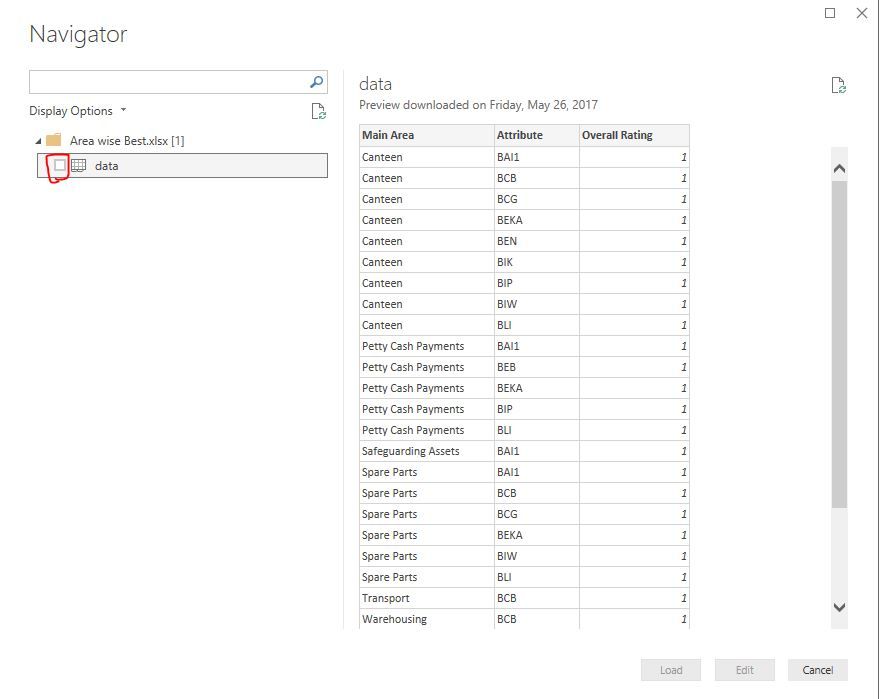
I can select an Excel Workbook. I can select a worksheet and I see the table in the pane. However, the load button remains gray. This started happing today.
Been using the Power BI for weeks and everything was working.
Even the tables that did work do not work now.
I even went as for to uninstall Power BI and reinstall.
Any help greatly appreciated.
Gary
Solved! Go to Solution.
Above tick box is missing on your Power BI desktop or is it still there? If it's there try to update it to latest version and see.
I did not see the checkbox to the left of the spreadsheet file. I clicked the checkbox, and everything is working.
Thanks so much I was losing my mind.
Gary
If you love stickers, then you will definitely want to check out our Community Sticker Challenge!
Check out the January 2026 Power BI update to learn about new features.
| User | Count |
|---|---|
| 65 | |
| 64 | |
| 45 | |
| 21 | |
| 18 |
| User | Count |
|---|---|
| 115 | |
| 114 | |
| 38 | |
| 36 | |
| 26 |