Don't miss your chance to take exam DP-600 or DP-700 on us!
Request nowLearn from the best! Meet the four finalists headed to the FINALS of the Power BI Dataviz World Championships! Register now
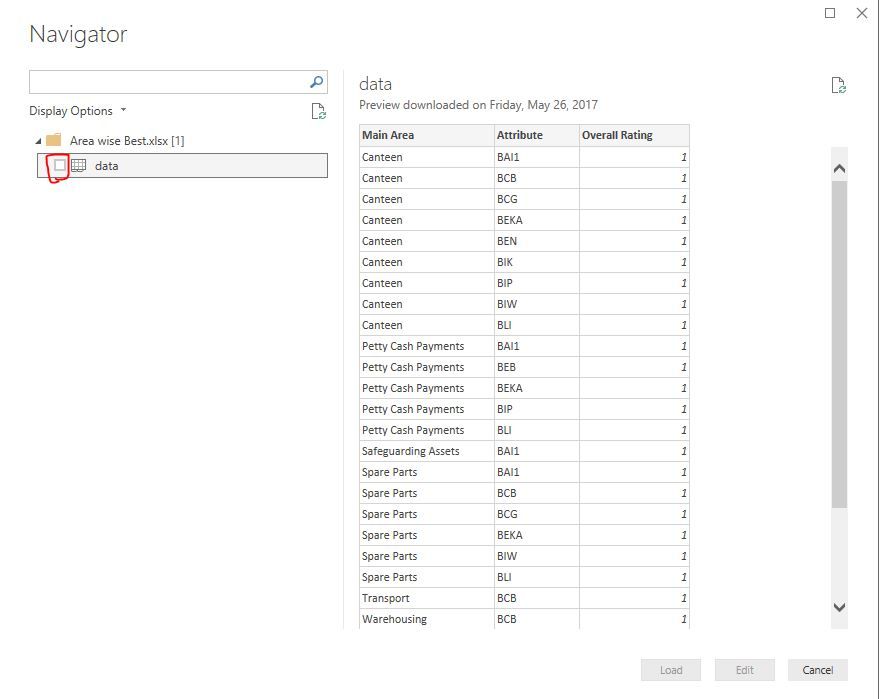
I can select an Excel Workbook. I can select a worksheet and I see the table in the pane. However, the load button remains gray. This started happing today.
Been using the Power BI for weeks and everything was working.
Even the tables that did work do not work now.
I even went as for to uninstall Power BI and reinstall.
Any help greatly appreciated.
Gary
Solved! Go to Solution.
Above tick box is missing on your Power BI desktop or is it still there? If it's there try to update it to latest version and see.
I did not see the checkbox to the left of the spreadsheet file. I clicked the checkbox, and everything is working.
Thanks so much I was losing my mind.
Gary
Share feedback directly with Fabric product managers, participate in targeted research studies and influence the Fabric roadmap.
Check out the February 2026 Power BI update to learn about new features.
| User | Count |
|---|---|
| 55 | |
| 48 | |
| 38 | |
| 16 | |
| 15 |
| User | Count |
|---|---|
| 85 | |
| 70 | |
| 38 | |
| 28 | |
| 25 |