cancel
Showing results for 
Search instead for 
Did you mean: 

Try your skills in the Power BI Dataviz World Championship! Round one ends June 26. Join now

Reply
gkakun
Helper III
Helper III

Event duration

Hi all,


I have a question, i have this table, and im trying to know how long spesific escalation was in each event type. For example- escalation 168 opened-->moved to on hold-->reopened---> moved to on hold again---> reoepened again and then closed.


i want to know for how long it was on hold and open? 


Thanks in advanced!  


Capture.PNG

1 ACCEPTED SOLUTION

Hi @gkakun ,


You are correct, I have made the contrary logic how long does it take to get from the previous status.


Replace the calculations by:

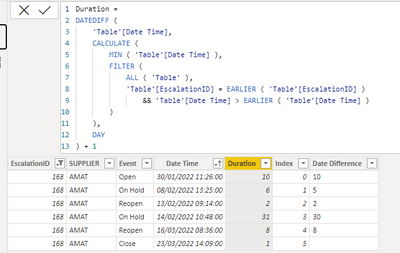
Duration = 
DATEDIFF (
    'Table'[Date Time],
    CALCULATE (
        MIN ( 'Table'[Date Time] ),
        FILTER (
            ALL ( 'Table' ),
            'Table'[EscalationID] = EARLIER ( 'Table'[EscalationID] )
                && 'Table'[Date Time] > EARLIER ( 'Table'[Date Time] )
        )
    ),
    DAY
) + 1


try if  #"Added Index"[EscalationID]{[Index] + 1} = [EscalationID] then  Duration.Days( ( #"Added Index"[Date Time]{[Index] + 1}) - [Date Time]) + 1 else null otherwise null

MFelix_0-1653223077862.png


MFelix_1-1653223090178.png


Regards

Miguel Félix


Did I answer your question? Mark my post as a solution!

Proud to be a Super User!

Check out my blog: Power BI em Português


View solution in original post

4 REPLIES 4
gkakun
Helper III
Helper III

Thanks a lot! its working. 

MFelix
Super User
Super User

Hi @gkakun ,


Try to add the following column to your model:

Duration =
DATEDIFF (
    CALCULATE (
        MAX ( 'Table'[Date Time] ),
        FILTER (
            ALL ( 'Table' ),
            'Table'[EscalationID] = EARLIER ( 'Table'[EscalationID] )
                && 'Table'[Date Time] < EARLIER ( 'Table'[Date Time] )
        )
    ),
    'Table'[Date Time],
    DAY
)

This is in days but you can the use it in hours months, and so on.


Now just use the status to get the sum of that value:
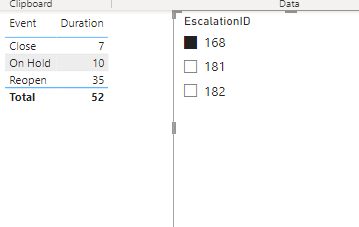
MFelix_0-1652968685785.png


You can also do this on M Query:

  • Sort the table by EscalationID and then by Data time
  • Add an Index Column
  • Add the following calculated column:
try if  #"Added Index"[EscalationID]{[Index] - 1} = [EscalationID] then  Duration.Days( ([Date Time] - #"Added Index"[Date Time]{[Index] - 1})) else null otherwise null


Result below:
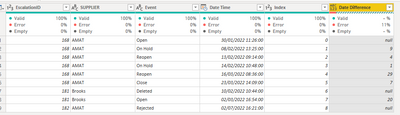
MFelix_1-1652969193470.png


Has you can see below both of the columns have similar results:


MFelix_2-1652969460679.png

The variations has to do with the time conversion on DAX and Power Query.


Regards

Miguel Félix


Did I answer your question? Mark my post as a solution!

Proud to be a Super User!

Check out my blog: Power BI em Português



Hi Friend,


Thanks a lot for your help.


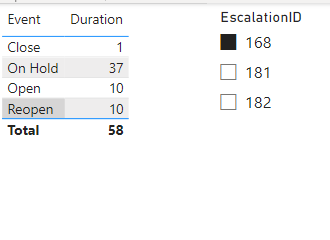
The logic is not working well. For example, escalation number 168 was on hold from Feb 8 until Feb 13 (on hold, and then reopened, 5 days), and then was o hold from Feb 14 until March 16, and then reopened, and closedf on March 23 (32 days). Overall 37 days and not 10  

Hi @gkakun ,


You are correct, I have made the contrary logic how long does it take to get from the previous status.


Replace the calculations by:

Duration = 
DATEDIFF (
    'Table'[Date Time],
    CALCULATE (
        MIN ( 'Table'[Date Time] ),
        FILTER (
            ALL ( 'Table' ),
            'Table'[EscalationID] = EARLIER ( 'Table'[EscalationID] )
                && 'Table'[Date Time] > EARLIER ( 'Table'[Date Time] )
        )
    ),
    DAY
) + 1


try if  #"Added Index"[EscalationID]{[Index] + 1} = [EscalationID] then  Duration.Days( ( #"Added Index"[Date Time]{[Index] + 1}) - [Date Time]) + 1 else null otherwise null

MFelix_0-1653223077862.png


MFelix_1-1653223090178.png


Regards

Miguel Félix


Did I answer your question? Mark my post as a solution!

Proud to be a Super User!

Check out my blog: Power BI em Português


Helpful resources

Announcements
Fabric Data Days is here Carousel

Data Days 2026

Don't miss out on Data Days, June 15 through August 7. Learn Fabric, Power BI, SQL, AI and more.

Power BI DataViz World Championships carousel

Power BI DataViz World Championships - June 2026

A new Power BI DataViz World Championship is coming this June! Don't miss out on submitting your entry.