cancel
Showing results for 
Search instead for 
Did you mean: 

The Power BI Data Visualization World Championships is back! Get ahead of the game and start preparing now! Learn more

Reply
Dellis81
Post Prodigy
Post Prodigy

Using filter with rounded primary key

Hello


I am fine tuning conditional formatting measures for a matrix visual.   The financial statement layout table has a primary key - which is  basically a sort order, including blank rows. 

In my "test" measure - I would like to return the result where the "rounded" primary key is equal to the PK measure.   In the example below - the PKmeasure grouped in red should return the result in blue.

For example the desired result for PK row 310298.999 would be $108,689.69 (as displayed in row 310299)
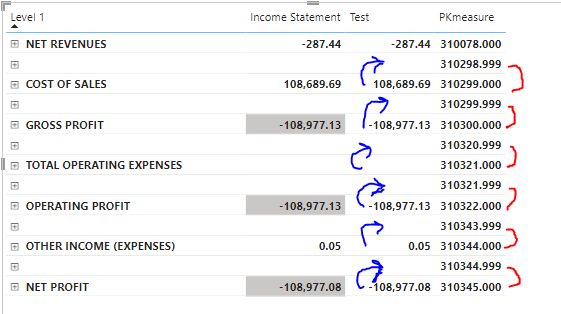
BlankRowMatrix.PNG

Below is my test measure.   I have tried various combinations of the All/Values on the "Financial_Statement+Layout" table

Test = 

VAR RoundPK = round([PKmeasure],0)
VAR RowValue =
    CALCULATE([FinancialReport SubTotals],
        keepfilters(filter(Financial_Statement_Layout,Financial_Statement_Layout[PK]=RoundPk))
    )
Return 

RowValue

The PKmeasure is basically a row index on the Financial_Statement_Layout' table

Again, all this is to help in my conditional formatting of a matrix financial statement.  The actual financial statement values are working as expected.

Thanks to the great community support!


1 REPLY 1
amitchandak
Super User
Super User

@Dellis81 , Not very clear. You can create a color measure and and use that using field value option


example

Color sales = if(AVERAGE(Sales[Sales Amount])<170,"green","red")


Color Year = if(FIRSTNONBLANK('Table'[Year],2014)

<=2016,"lightgreen",if(FIRSTNONBLANK('Table'[Year],2014)>2018,"red","yellow"))


How to do conditional formatting by measure and apply it on pie?
https://www.youtube.com/watch?v=RqBb5eBf_I4&list=PLPaNVDMhUXGYo50Ajmr4SgSV9HIQLxc8L
https://community.powerbi.com/t5/Community-Blog/Power-BI-Conditional-formatting-the-Pie-Visual/ba-p/...


Share with Power BI Enthusiasts: Full Power BI Video (20 Hours) YouTube
Microsoft Fabric Series 60+ Videos YouTube
Microsoft Fabric Hindi End to End YouTube

Helpful resources

Announcements
Power BI DataViz World Championships

Power BI Dataviz World Championships

The Power BI Data Visualization World Championships is back! Get ahead of the game and start preparing now!

December 2025 Power BI Update Carousel

Power BI Monthly Update - December 2025

Check out the December 2025 Power BI Holiday Recap!

FabCon Atlanta 2026 carousel

FabCon Atlanta 2026

Join us at FabCon Atlanta, March 16-20, for the ultimate Fabric, Power BI, AI and SQL community-led event. Save $200 with code FABCOMM.