Hello
I am fine tuning conditional formatting measures for a matrix visual. The financial statement layout table has a primary key - which is basically a sort order, including blank rows.
In my "test" measure - I would like to return the result where the "rounded" primary key is equal to the PK measure. In the example below - the PKmeasure grouped in red should return the result in blue.
For example the desired result for PK row 310298.999 would be $108,689.69 (as displayed in row 310299)
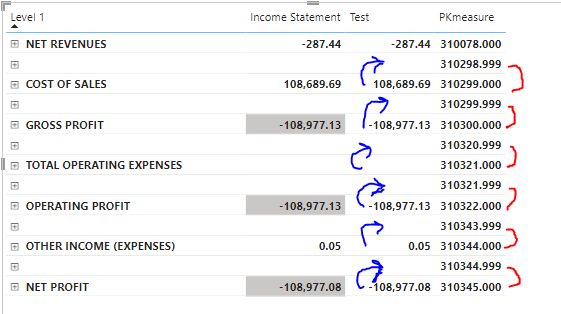
Below is my test measure. I have tried various combinations of the All/Values on the "Financial_Statement+Layout" table
Test =

VAR RoundPK = round([PKmeasure],0)
VAR RowValue =
    CALCULATE([FinancialReport SubTotals],
        keepfilters(filter(Financial_Statement_Layout,Financial_Statement_Layout[PK]=RoundPk))
    )
Return

RowValue
The PKmeasure is basically a row index on the Financial_Statement_Layout' table
Again, all this is to help in my conditional formatting of a matrix financial statement. The actual financial statement values are working as expected.
Thanks to the great community support!


