cancel
Showing results for 
Search instead for 
Did you mean: 

Learn from the best! Meet the four finalists headed to the FINALS of the Power BI Dataviz World Championships! Register now

Reply
ytc-reports
Helper I
Helper I

Event Duration Analysis

Hi all! My previous post somehow got lost in the abyss of the interwebs, so I'm making it again.


I have a table which records device usage in my business. It records the device name, the time in, and time out.


time outtime indevice name
31/3/17 13:2831/3/17 13:390001
31/3/17 13:3131/3/17 14:380002
31/3/17 13:4931/3/17 14:250001


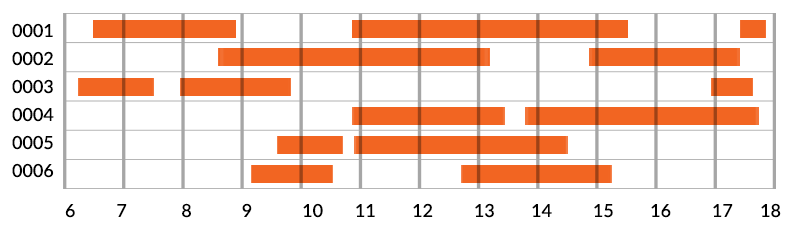
The long and short of our goal is this: to be able to calculate how many hours each day the devices are being used (not each individual device, I don't think, but all devices together), and to be able to isolate which times of day in particular they are being under-used.


A device has a 12 hour period each day where it can be used, and there are 6 devices, so in total we're comparing time the devices checked out to 72 hours (maybe with some kind of pie chart or something showing what percent of 72 hours the sum of use-time is).


I was also envisioning some sort of graph that looks like this, to illustrate device checkout times:

timedata.png


Anything powerBI can do to make these tasks easy for me?

 
3 REPLIES 3
Eric_Zhang
Microsoft Employee
Microsoft Employee

@ytc-reports

I think you can create a calculated column to get the during seconds of each record. And then aggregate the duration by day to calculate the utilization percentage.


duration = DATEDIFF('Table'[time out],'Table'[time in],SECOND)

As to the gantt chart, AFAIK, there's no offical visuals that support time level. The gantt visual in @dkay84_PowerBI link is for date level. If you still prefer that kind of visual, you can submit your idea at Power BI Ideas and vote it up.

dkay84_PowerBI
Microsoft Employee
Microsoft Employee

There is a custom visual for this:

https://app.powerbi.com/visuals/show/Gantt1448688115699

Also, you can easily extract a duration and/or hour of the day to get a summary of usage by hour. Not sure exactly what your requirements are but this should get you started.
ytc-reports
Helper I
Helper I

Hi all!


I have a table which records device usage in my business. It records the device name, the time in, and time out.


time outtime indevice name
31/3/17 13:2831/3/17 13:390001
31/3/17 13:3131/3/17 14:380002
31/3/17 13:4931/3/17 14:250001


The long and short of our goal is this: to be able to calculate how many hours each day the devices are being used (not each individual device, I don't think, but all devices together), and to be able to isolate which times of day in particular they are being under-used.


A device has a 12 hour period each day where it can be used, and there are 6 devices, so in total we're comparing time the devices checked out to 72 hours (maybe with some kind of pie chart or something showing what percent of 72 hours the sum of use-time is).


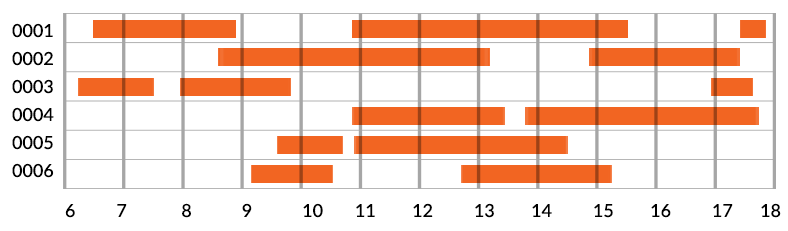
I was also envisioning some sort of graph that looks like this, to illustrate device checkout times:

timedata.png


Anything powerBI can do to make these tasks easy for me?

Helpful resources

Announcements
Join our Fabric User Panel

Join our Fabric User Panel

Share feedback directly with Fabric product managers, participate in targeted research studies and influence the Fabric roadmap.

March Power BI Update Carousel

Power BI Community Update - March 2026

Check out the March 2026 Power BI update to learn about new features.