cancel
Showing results for 
Search instead for 
Did you mean: 

Learn from the best! Meet the four finalists headed to the FINALS of the Power BI Dataviz World Championships! Register now

Reply
stanbeamish
Frequent Visitor

Error on using SQL Connector for Azure Data Explorer (ADX)

Hello community,


as of 2 weeks ago, when using the Power BI Desktop (Version: 2.119.870.0), I have most of the time problems executing data refresh regarding those tables that make use of the SQL Connector for the Azure Data Explorer.


- Deleting all connection configuration and login anew sometimes helps but not always.

- Disable parallel loading of tables seemed to help, but it did not

- Limiting the data read in seemed to help, but it did not

- setting a timeout on the SQL query (e.g. 1 minute) did not result in a successful execution


It can be be observed that connecting to the ADX and also reading data is working just as it supposed to do (and it did so for the last 12 months perfectly with the exact settings), 
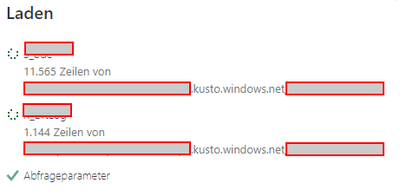
stanbeamish_0-1691055987811.png

But until approx. two agao, I always get these kind of errors
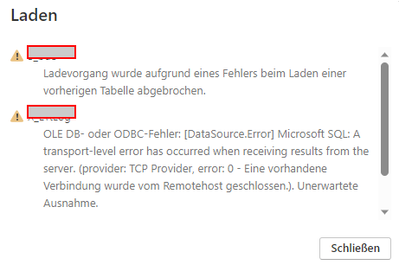
stanbeamish_1-1691056084209.png

Has anyone an idea, why the remote host is closing the connection?

I tested connection with Kust.Explorer and Azure Data Explorer on desktop - no problems at all.


Greetings


2 REPLIES 2
stanbeamish
Frequent Visitor

Hi, @Anonymous ,


thank you very much for your reply.

The solution to me was to eliminate all queries using SQL Connector and just make use of kusto query language (KQL).


Maybe of interest to others:
Use the "explain" keyword on top of the SQL query in the Kusto.Explorer to translate an SQL query to KQL

e.g.

stanbeamish_0-1691473211409.png

Best Regards

Anonymous
Not applicable

Hi, @stanbeamish 


Please refer to the following links hope it helps.

Solved: OLE DB or ODBC error: [DataSource.Error] - Microsoft Fabric Community

Dataverse connection error - Microsoft Fabric Community

A transport-level error has occurred when receivin... - Microsoft Fabric Community


Best Regards,

Community Support Team _Charlotte

If this post helps, then please consider Accept it as the solution to help the other members find it more quickly.

Helpful resources

Announcements
New to Fabric survey Carousel

New to Fabric Survey

If you have recently started exploring Fabric, we'd love to hear how it's going. Your feedback can help with product improvements.

Power BI DataViz World Championships carousel

Power BI DataViz World Championships - June 2026

A new Power BI DataViz World Championship is coming this June! Don't miss out on submitting your entry.

Join our Fabric User Panel

Join our Fabric User Panel

Share feedback directly with Fabric product managers, participate in targeted research studies and influence the Fabric roadmap.

March Power BI Update Carousel

Power BI Community Update - March 2026

Check out the March 2026 Power BI update to learn about new features.
