
cancel
Showing results for 
Search instead for 
Did you mean: 

July 7 - July 17 | Round 2 of the Power BI Dataviz World Championships. Don't miss your chance! Learn more

Reply
ManuelGeiger
Helper I
Helper I

Error message

Hi all,


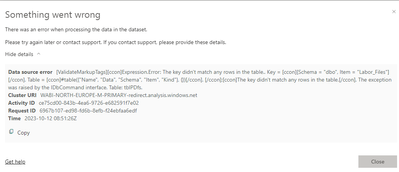
I get below error when trying to refresh my report in power bi service:

ManuelGeiger_0-1697101379653.png


I know what it means but the error only appears when refreshing in the service. In the desktop version it's working fine. Table names are also not changed.


Any idea?

1 ACCEPTED SOLUTION
ManuelGeiger
Helper I
Helper I

If anyone encounters this issue - for whatever reason it helped me to change the credentials to "Basic" within power bi service.

View solution in original post

7 REPLIES 7
ManuelGeiger
Helper I
Helper I

If anyone encounters this issue - for whatever reason it helped me to change the credentials to "Basic" within power bi service.

Idrissshatila
Super User
Super User

Hello @ManuelGeiger ,


can you try refreshing it from power query and check the error there.


If I answered your question, please mark my post as solution, Appreciate your Kudos 👍

Follow me on Linkedin
Vote for my Community Mobile App Idea 💡


Did I answer your question? Mark my post as a solution! Appreciate your Kudos
Follow me on LinkedIn linkedIn
Vote for my Community Mobile App Idea

Proud to be a Super User!


Refresh in power query works without issues

@ManuelGeiger , then try republishing it to service and then try to refresh.


If I answered your question, please mark my post as solution, Appreciate your Kudos 👍

Follow me on Linkedin
Vote for my Community Mobile App Idea 💡


Did I answer your question? Mark my post as a solution! Appreciate your Kudos
Follow me on LinkedIn linkedIn
Vote for my Community Mobile App Idea

Proud to be a Super User!


Already done twice. No impact..

sergej_og
Super User
Super User

It looks like you run into an empty table.

do you use a gateway to access your data?

Hey, no I don't. Everything is coming from the cloud. All other reports which use the same data sources are also working fine.

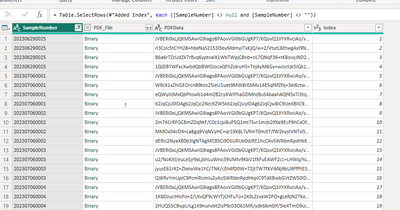
This is the table before any steps in power query:

ManuelGeiger_0-1697103275703.png


After all steps:

ManuelGeiger_1-1697103284920.png


Helpful resources

Announcements
FabCon and SQLCon Barcelona 2026

FabCon & SQLCon – Barcelona 2026

Join us in Barcelona for FabCon and SQLCon, the Fabric, Power BI, SQL, and AI community event. Save €200 with code FABCMTY200.

60 days of Data Days Carousel

Data Days 2026

Join Fabric Data Days 2026: 60 days of free live/on-demand sessions, challenges, study groups, and certification opportunities.

Power BI DataViz World Championships carousel

Power BI DataViz World Championships - June 2026

A new Power BI DataViz World Championship is coming this June! Don't miss out on submitting your entry.

Top Solution Authors