Share feedback directly with Fabric product managers, participate in targeted research studies and influence the Fabric roadmap.
Sign up nowGet Fabric certified for FREE! Don't miss your chance! Learn more
Hello all,
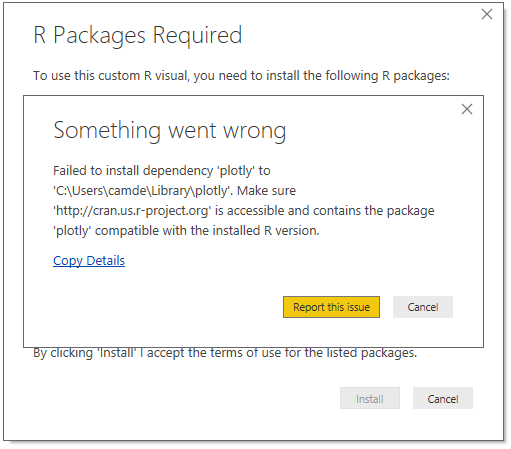
Updated Screenshot of Error:
I've been trying to install Plotly to use the ARIMA forecasting visualizations and it never completes. There were other required packages which installed without issue. Unfortuneatly, I don't have any error message - the installation animation just spins and spins. Any help with solving this issue would be greatly appreciated!
Thanks!
CK
Solved! Go to Solution.
Can you try manually installing the Plotly package directly in R using the install.packages("plotly") command? I've also had some dependencies hang if attempting to install directly from Power BI Desktop on occasion.
Hi, this is really embarassing to say the least. Last week the solution seems to work. All the R packaged as instructed in the second link were installed. However opening the Power BI today I got the same message. I am not sure is it because cran.usr-project.org website blocked by our IT department.
I actually sorted this out. i have installed R from this site. https://cran.r-project.org/ (R for windows). This worked. Probabaly all the above and this.
Can you try manually installing the Plotly package directly in R using the install.packages("plotly") command? I've also had some dependencies hang if attempting to install directly from Power BI Desktop on occasion.
That worked! Thanks so much for the help!
If you love stickers, then you will definitely want to check out our Community Sticker Challenge!
Check out the January 2026 Power BI update to learn about new features.
| User | Count |
|---|---|
| 64 | |
| 63 | |
| 49 | |
| 21 | |
| 18 |
| User | Count |
|---|---|
| 121 | |
| 118 | |
| 38 | |
| 36 | |
| 29 |