This is best Fabric, Power BI, SQL and AI community event. How do we know? The last event sold out! Save €200 with code FABCMTY200.
Register nowJuly 28 - August 9 | Final Round of the Power BI Dataviz World Championships. This is your chance. Learn more
Hello all,
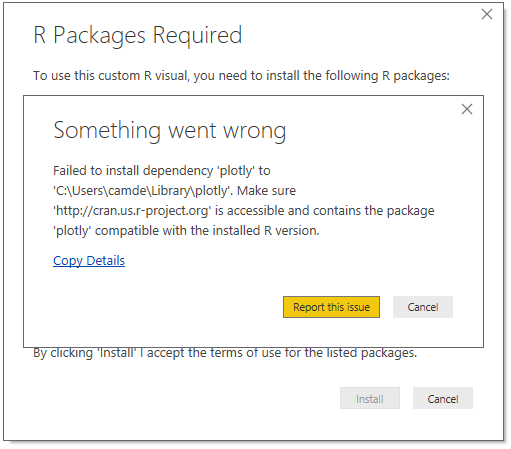
Updated Screenshot of Error:
I've been trying to install Plotly to use the ARIMA forecasting visualizations and it never completes. There were other required packages which installed without issue. Unfortuneatly, I don't have any error message - the installation animation just spins and spins. Any help with solving this issue would be greatly appreciated!
Thanks!
CK
Solved! Go to Solution.
Can you try manually installing the Plotly package directly in R using the install.packages("plotly") command? I've also had some dependencies hang if attempting to install directly from Power BI Desktop on occasion.
Hi, this is really embarassing to say the least. Last week the solution seems to work. All the R packaged as instructed in the second link were installed. However opening the Power BI today I got the same message. I am not sure is it because cran.usr-project.org website blocked by our IT department.
I actually sorted this out. i have installed R from this site. https://cran.r-project.org/ (R for windows). This worked. Probabaly all the above and this.
Can you try manually installing the Plotly package directly in R using the install.packages("plotly") command? I've also had some dependencies hang if attempting to install directly from Power BI Desktop on occasion.
That worked! Thanks so much for the help!
Join us in Barcelona for FabCon and SQLCon, the Fabric, Power BI, SQL, and AI community event. Save €200 with code FABCMTY200.
If you love stickers, then you will definitely want to check out our community sticker challenge, Barcelona edition!
Check out the July 2026 Power BI update to learn about new features.
| User | Count |
|---|---|
| 25 | |
| 23 | |
| 19 | |
| 17 | |
| 14 |
| User | Count |
|---|---|
| 25 | |
| 24 | |
| 20 | |
| 19 | |
| 19 |