cancel
Showing results for 
Search instead for 
Did you mean: 

Learn from the best! Meet the four finalists headed to the FINALS of the Power BI Dataviz World Championships! Register now

Reply
gpapasara
Frequent Visitor

Equals

Hi people 🙂


I have 2 tables and I would like to populate from one to the other.

I have on the first dates and for each date lots and lots of entries, in the second I have made a Distinct(date) and have calculated the average per date and now I would like to return to the first table and add a column that will put that average per date to the dates on that.


Does that make any sense to you?


Thanks 🙂

1 ACCEPTED SOLUTION

Hi @gpapasara,

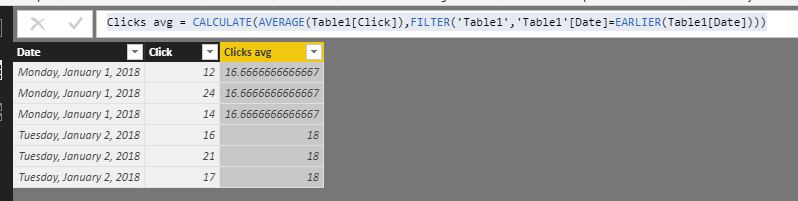
Based on my test, you could use the formula in your table 1:

Clicks avg = CALCULATE(AVERAGE(Table1[Click]),FILTER('Table1','Table1'[Date]=EARLIER(Table1[Date])))

Result:

1.PNG

If I mistunderstand you, could you please share me the pbix file and your desired result if possible?


Regards,

Daniel He

Community Support Team _ Daniel He
If this post helps, then please consider Accept it as the solution to help the other members find it more quickly.

View solution in original post

5 REPLIES 5
kaushikd
Resolver II
Resolver II

I do not see any use of second table here, may be Ihave not understand the requirement. But If you want to store DistinctDate and Avg of something, just create a measure(Average) in the First Table and pull the date and the measure into a visual it will aggregate the Measure for each date(no repetation in the date)

v-danhe-msft
Microsoft Employee
Microsoft Employee

Hi @gpapasara,

Could you please post me some sample data and your desired result if possible?


Regards,

Daniel He

Community Support Team _ Daniel He
If this post helps, then please consider Accept it as the solution to help the other members find it more quickly.

Thank you for your interest 🙂


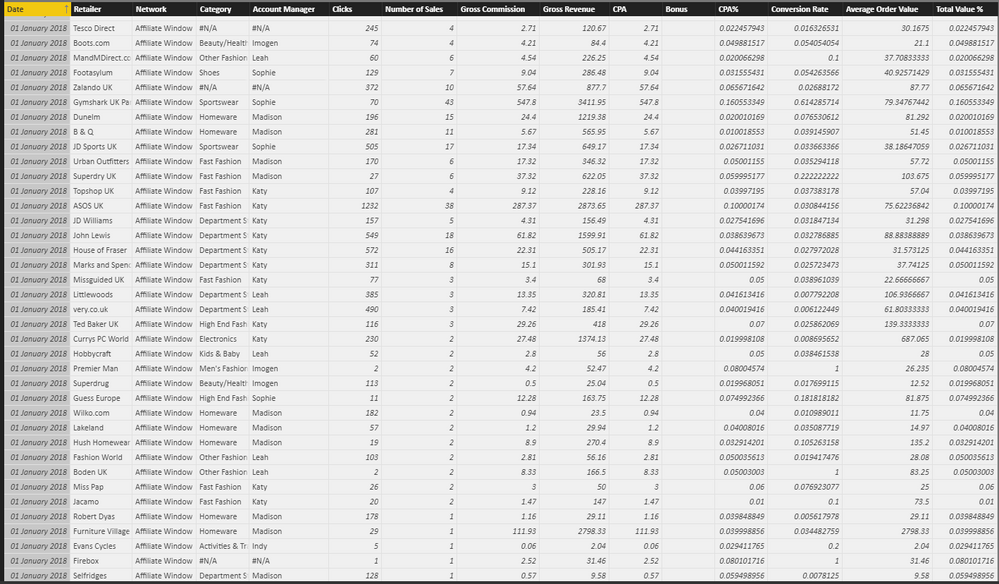
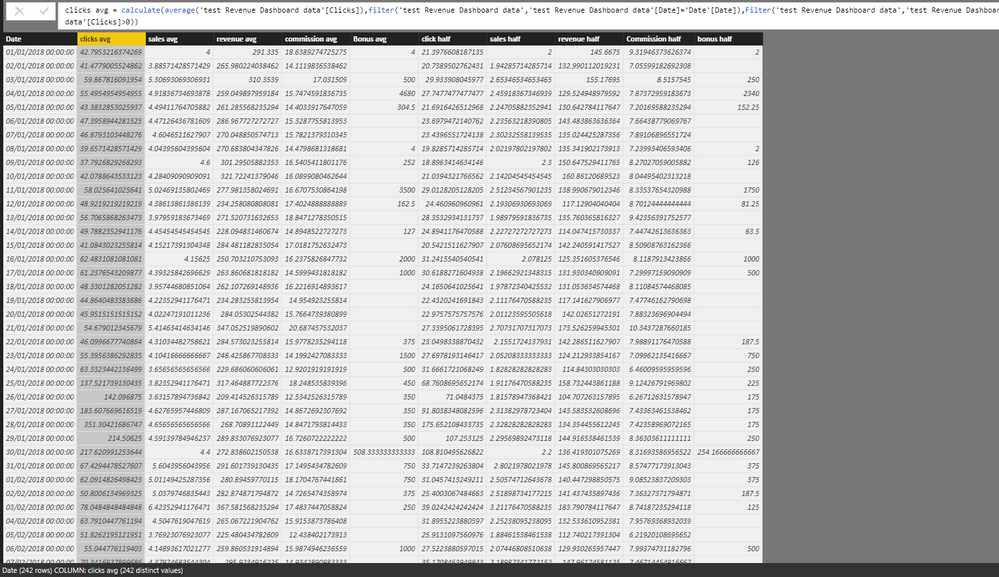
You will find below the 2 tables that I have. The table 2 is calculated from table oneand what I would like to have now is one the first table next to each date the averages that I have calculated in the 2nd one so if I have the click averege fro example for the 1st January it will be 42.795 on every entry that is 01/01/2018 on the first table.


I don't know if I explained that clearly, if not please let me know and I will try again 🙂

Table1Table1ITable2Table2

Hi @gpapasara,

Based on my test, you could use the formula in your table 1:

Clicks avg = CALCULATE(AVERAGE(Table1[Click]),FILTER('Table1','Table1'[Date]=EARLIER(Table1[Date])))

Result:

1.PNG

If I mistunderstand you, could you please share me the pbix file and your desired result if possible?


Regards,

Daniel He

Community Support Team _ Daniel He
If this post helps, then please consider Accept it as the solution to help the other members find it more quickly.

Thank you very much sir, that was a great help 🙂

Helpful resources

Announcements
Power BI DataViz World Championships carousel

Power BI DataViz World Championships - June 2026

A new Power BI DataViz World Championship is coming this June! Don't miss out on submitting your entry.

Join our Fabric User Panel

Join our Fabric User Panel

Share feedback directly with Fabric product managers, participate in targeted research studies and influence the Fabric roadmap.

March Power BI Update Carousel

Power BI Community Update - March 2026

Check out the March 2026 Power BI update to learn about new features.