cancel
Showing results for 
Search instead for 
Did you mean: 

Next up in the FabCon + SQLCon recap series: The roadmap for Microsoft SQL and Maximizing Developer experiences in Fabric. All sessions are available on-demand after the live show. Register now

Reply
FrisoW
Helper I
Helper I

Empty columns

Dear,


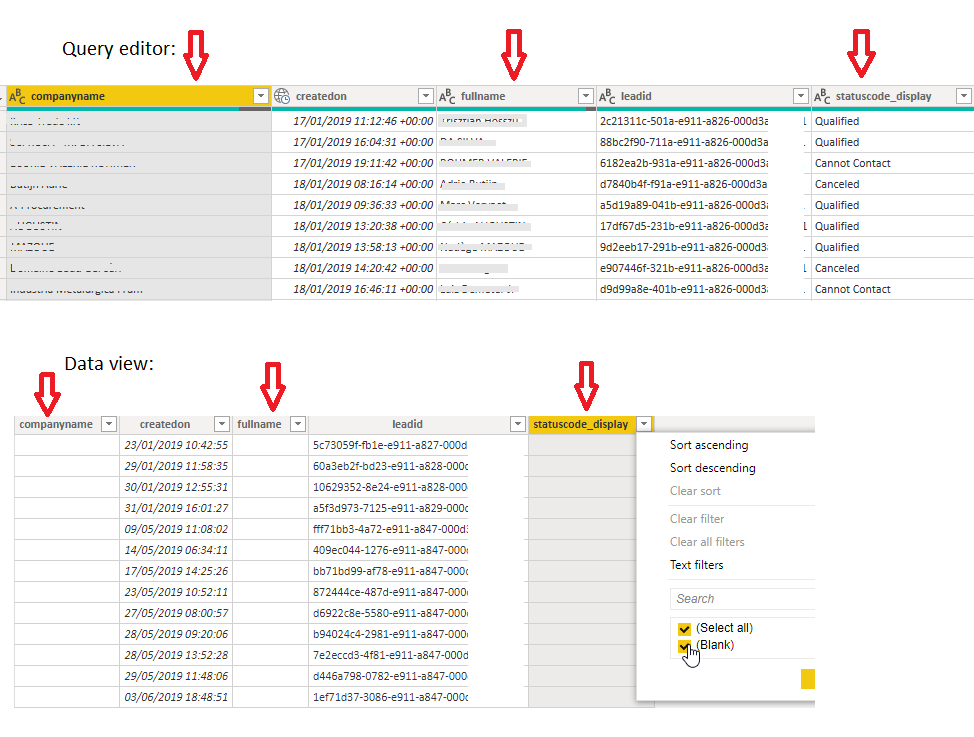
Since a couple of days I have an issue with data in a dashboard. When importing a table, all columns are filled in in the query view. When I apply & close, the data view has 3 empty columns. I'm completely stuck. PBI has been updated after having this problem without any luck. I had this before and out of frustration completely started over, but now days of work went in this project so this is not an option.


Data source is Microsoft CRM (crm4.dynamics.com)


pbidata.png

Any suggestions?


Thanks

1 ACCEPTED SOLUTION

@FrisoW, Can I see the screenshot of the transformation steps?
OR 
You can do 1 thing : You can filter the blank values and then 'Close & Apply' the changes and see what you can see?

View solution in original post

5 REPLIES 5
rajulshah
Resident Rockstar
Resident Rockstar

Hello @FrisoW,


It is very difficult to judge without going through the issue or logistics. Can you provide a sample file or the steps in the query editor for the table?


Maybe it would be little helpful to understand the issue.

Hi rajulshah,


I understand. I'll try elaborate because I won't be able to provide a sample file as the problem is limited to my project and this contains confidential data.


1. Get data, source is Dynamics CRM

2. Transform data

3. In query editor, I have 5 columns, with 0 blanks in all 5 columns and over 30000 rows

4. I close the query editor

5. I open the data view, 3 columns are completely empty

6. Also when I create a table in the report view, the columns are blank


I tried deleting the table and adding it again, but the same 3 columns remain empty.

No relatingships have been set yet.


This must be a bug?


@FrisoW, Can I see the screenshot of the transformation steps?
OR 
You can do 1 thing : You can filter the blank values and then 'Close & Apply' the changes and see what you can see?

Transformation steps:


Source

Navigation

Removed Other Columns (all but those 5)


Filtered blanks in statuscode_display column, all 30000 values appeared.

Other columns remained empty, so filtered those as well. All values appeared.


This makes completely no sense but you managed to solve it anyway, thanks a lot!

Hi @FrisoW ,

It seems that you have resolved the issue. Please accept the helpful answer as a solution. More people who have the same problem will benefit from the thread.

Best Regards,
Xue Ding
If this post helps, then please consider Accept it as the solution to help the other members find it more quickly.

Helpful resources

Announcements
New to Fabric survey Carousel

New to Fabric Survey

If you have recently started exploring Fabric, we'd love to hear how it's going. Your feedback can help with product improvements.

Power BI DataViz World Championships carousel

Power BI DataViz World Championships - June 2026

A new Power BI DataViz World Championship is coming this June! Don't miss out on submitting your entry.

Join our Fabric User Panel

Join our Fabric User Panel

Share feedback directly with Fabric product managers, participate in targeted research studies and influence the Fabric roadmap.

March Power BI Update Carousel

Power BI Community Update - March 2026

Check out the March 2026 Power BI update to learn about new features.