Join us at FabCon Atlanta from March 16 - 20, 2026, for the ultimate Fabric, Power BI, AI and SQL community-led event. Save $200 with code FABCOMM.
Register now!Vote for your favorite vizzies from the Power BI Dataviz World Championship submissions. Vote now!
Hi,
May I ask you if there is a possible way to do the same but for the decrease?
If the code appears today but no longer tomorrow I want it to reflect it as a negative.
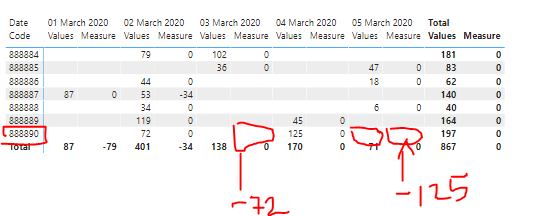
Here I attached an example:
For example the code 888890 had value 72 for March 2nd, but it didn't have any values on March 3rd So i want the measure to return a -72 On March 3rd. An d the same case for March 4th and 5th returning a -125. So that the measure now instead of giving me the total sum for thos positive values I want it to give me only the sum for the negative ones.
Hope this is possible!
Thanks in advance.
Solved! Go to Solution.
Hi,
According to your description, Please try this measure:
Measure =
VAR a =
CALCULATE (
SUM ( 'Table'[Values] ),
FILTER (
ALLSELECTED ( 'Table'[Date] ),
'Table'[Date]
= CALCULATE (
MAX ( 'Table'[Date] ),
FILTER (
ALLSELECTED ( 'Table' ),
'Table'[Date] < MIN ( 'Table'[Date] )
&& 'Table'[Date Code] IN DISTINCT ( 'Table'[Date Code] )
)
)
)
)
RETURN
IF (
a = BLANK (),
IF ( MAX ( 'Table'[Values] ) = BLANK (), BLANK (), 0 ),
SUM ( 'Table'[Values] ) - a
)The result shows:
Here is my test pbix file:
Hope this helps.
Best Regards,
Giotto Zhi
Hi,
According to your description, Please try this measure:
Measure =
VAR a =
CALCULATE (
SUM ( 'Table'[Values] ),
FILTER (
ALLSELECTED ( 'Table'[Date] ),
'Table'[Date]
= CALCULATE (
MAX ( 'Table'[Date] ),
FILTER (
ALLSELECTED ( 'Table' ),
'Table'[Date] < MIN ( 'Table'[Date] )
&& 'Table'[Date Code] IN DISTINCT ( 'Table'[Date Code] )
)
)
)
)
RETURN
IF (
a = BLANK (),
IF ( MAX ( 'Table'[Values] ) = BLANK (), BLANK (), 0 ),
SUM ( 'Table'[Values] ) - a
)The result shows:
Here is my test pbix file:
Hope this helps.
Best Regards,
Giotto Zhi
If you love stickers, then you will definitely want to check out our Community Sticker Challenge!
Check out the January 2026 Power BI update to learn about new features.
| User | Count |
|---|---|
| 70 | |
| 52 | |
| 38 | |
| 29 | |
| 22 |
| User | Count |
|---|---|
| 135 | |
| 122 | |
| 55 | |
| 37 | |
| 32 |