cancel
Showing results for 
Search instead for 
Did you mean: 

The Power BI Data Visualization World Championships is back! It's time to submit your entry. Live now!

Reply
Anonymous
Not applicable

Decreasing by code and date

Hi, 


May I ask you if there is a possible way to do the same but for the decrease?

If the code appears today but no longer tomorrow I want it to reflect it as a negative.


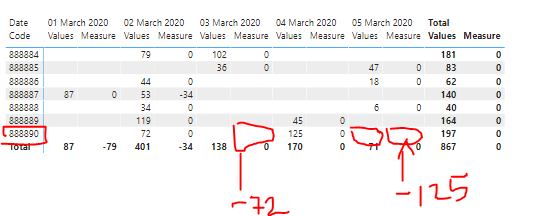
Here I attached an example: 


Capture3.PNG

For example the code 888890 had value 72 for March 2nd, but it didn't  have any values on March 3rd So i want the measure to return a -72 On March 3rd.  An d the same case for March 4th and 5th returning a -125. So that the measure now instead of giving me the total sum for thos positive values I want it to give me only the sum for the negative ones. 


Hope this is possible!


Thanks in advance. 


@Ashish_Mathur 

1 ACCEPTED SOLUTION
v-gizhi-msft
Community Support
Community Support

Hi,


According to your description, Please try this measure:

Measure = 
VAR a =
    CALCULATE (
        SUM ( 'Table'[Values] ),
        FILTER (
            ALLSELECTED ( 'Table'[Date] ),
            'Table'[Date]
                = CALCULATE (
                    MAX ( 'Table'[Date] ),
                    FILTER (
                        ALLSELECTED ( 'Table' ),
                        'Table'[Date] < MIN ( 'Table'[Date] )
                            && 'Table'[Date Code] IN DISTINCT ( 'Table'[Date Code] )
                    )
                )
        )
    )
RETURN
    IF (
        a = BLANK (),
        IF ( MAX ( 'Table'[Values] ) = BLANK (), BLANK (), 0 ),
        SUM ( 'Table'[Values] ) - a
    )

The result shows:

2.PNG

Here is my test pbix file:

pbix 

Hope this helps.


Best Regards,

Giotto Zhi

View solution in original post

2 REPLIES 2
v-gizhi-msft
Community Support
Community Support

Hi,


According to your description, Please try this measure:

Measure = 
VAR a =
    CALCULATE (
        SUM ( 'Table'[Values] ),
        FILTER (
            ALLSELECTED ( 'Table'[Date] ),
            'Table'[Date]
                = CALCULATE (
                    MAX ( 'Table'[Date] ),
                    FILTER (
                        ALLSELECTED ( 'Table' ),
                        'Table'[Date] < MIN ( 'Table'[Date] )
                            && 'Table'[Date Code] IN DISTINCT ( 'Table'[Date Code] )
                    )
                )
        )
    )
RETURN
    IF (
        a = BLANK (),
        IF ( MAX ( 'Table'[Values] ) = BLANK (), BLANK (), 0 ),
        SUM ( 'Table'[Values] ) - a
    )

The result shows:

2.PNG

Here is my test pbix file:

pbix 

Hope this helps.


Best Regards,

Giotto Zhi

amitchandak
Super User
Super User

Can you share sample data and sample output.

Share with Power BI Enthusiasts: Full Power BI Video (20 Hours) YouTube
Microsoft Fabric Series 60+ Videos YouTube
Microsoft Fabric Hindi End to End YouTube

Helpful resources

Announcements
FabCon Atlanta 2026 carousel

FabCon Atlanta 2026

Join us at FabCon Atlanta, March 16-20, for the ultimate Fabric, Power BI, AI and SQL community-led event. Save $200 with code FABCOMM.