Get certified for free when you join Fabric Data Days 2026 and dive into Fabric, Power BI, SQL, AI, and other essential data skills.
Join nowJuly 7 - July 17 | Round 2 of the Power BI Dataviz World Championships. Don't miss your chance! Learn more
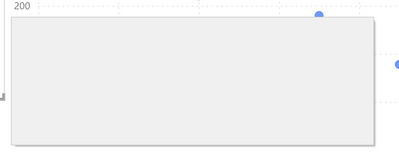
I am seeing entirely blank dialogs - just a grey box, which should be e.g. the confirmation-dialog when I delete a column or table.
I have seen this multiple times lately on at least 2 entirely different computers (work & private, 1x intel integrated gpu and 1x high-end-nvidia in the other, so graphics drivers should not be the cause).
Mouse-interaction works, the cursor changes on hot areas.
Nothing helps then but close and reopen.
Version: 2.103.881.0 64-bit (March 2022) on Win10
Solved! Go to Solution.
It seems this has vanished after some update.
its quite irritating, try clicking on the dialog box, the buttons are still there and if you click on it , it should work, its just guess work locating where it is. Not sure if would help at all but maybe clear your cache? but no idea if that works or not.
Proud to be a Super User!
Join us in Barcelona for FabCon and SQLCon, the Fabric, Power BI, SQL, and AI community event. Save €200 with code FABCMTY200.
Join Data Days 2026: 60 days of free live/on-demand sessions, challenges, study groups, and certification opportunities.
| User | Count |
|---|---|
| 29 | |
| 27 | |
| 24 | |
| 24 | |
| 18 |
| User | Count |
|---|---|
| 54 | |
| 50 | |
| 41 | |
| 33 | |
| 29 |