
Don't miss your chance to take the Fabric Data Engineer (DP-600) exam for FREE! Find out how by attending the DP-600 session on April 23rd (pacific time), live or on-demand.
Learn moreNext up in the FabCon + SQLCon recap series: The roadmap for Microsoft SQL and Maximizing Developer experiences in Fabric. All sessions are available on-demand after the live show. Register now
Hi!
i would like to know if we can edit dataset values by using R visual (and not R script in query)
For example : "dataset$values[i]=10" gives"unexpected input" as error
Hi @Paheli,
Based on error message, it think you inputted wrong script in r visual.
You can try to use below formula to modify specific element from data frame:
dataset[i,"values"] <- 10
Reference link:
Regards,
Xiaoxin Sheng
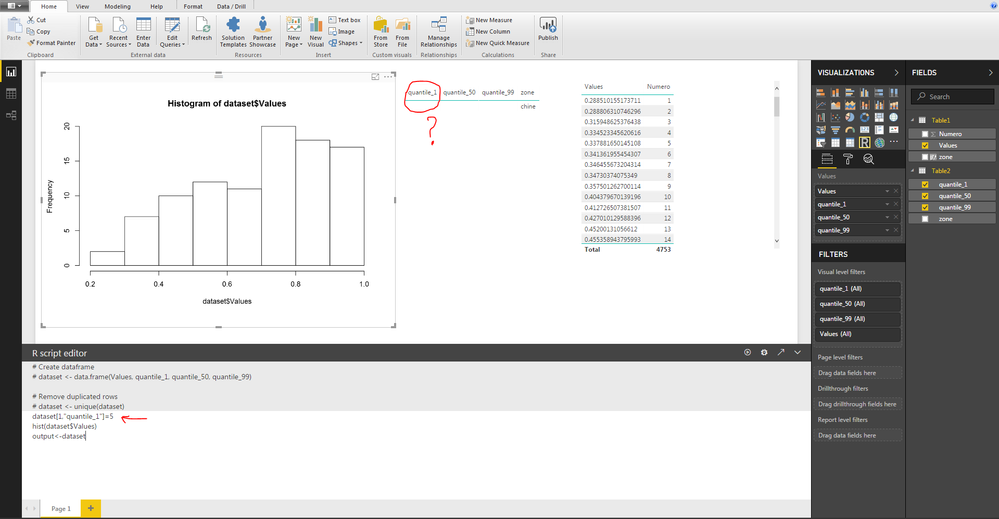
@Anonymous thanks for your reply but nothing happen when excute the code
here below the screenshot:
Hi @Paheli,
According to your screenshots, I found you use '=' to replace '<-', I'm not so sure if character '=' can work as '<-' in r script.
Maybe you can modify it and try again.
Regards,
Xiaoxin Sheng
Unfortunatley it doesn"t work even with <- or =
Try loading your code in R Studio and debug it there, it will be easier and that will rule out Power BI issues.
actually i us notepad to write my code and i test the code on powerbi because i try to edit a table within powerbi
@Anonymous
As a solution i plotted my tables on the R visuals it's a little bit limited because i can't select my data.
thank you for your reply
If you have recently started exploring Fabric, we'd love to hear how it's going. Your feedback can help with product improvements.
A new Power BI DataViz World Championship is coming this June! Don't miss out on submitting your entry.
Experience the highlights from FabCon & SQLCon, available live and on-demand starting April 14th.
| User | Count |
|---|---|
| 48 | |
| 40 | |
| 37 | |
| 20 | |
| 16 |
| User | Count |
|---|---|
| 70 | |
| 67 | |
| 32 | |
| 27 | |
| 25 |