
We've captured the moments from FabCon & SQLCon that everyone is talking about, and we are bringing them to the community, live and on-demand. Starts on April 14th. Register now
Hi!
i would like to know if we can edit dataset values by using R visual (and not R script in query)
For example : "dataset$values[i]=10" gives"unexpected input" as error
Hi @Paheli,
Based on error message, it think you inputted wrong script in r visual.
You can try to use below formula to modify specific element from data frame:
dataset[i,"values"] <- 10
Reference link:
Regards,
Xiaoxin Sheng
@Anonymous thanks for your reply but nothing happen when excute the code
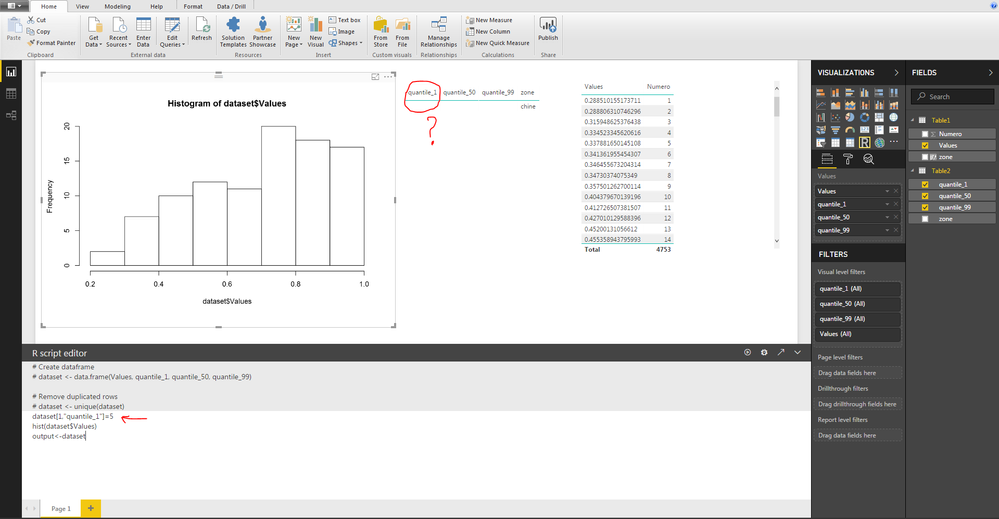
here below the screenshot:
Hi @Paheli,
According to your screenshots, I found you use '=' to replace '<-', I'm not so sure if character '=' can work as '<-' in r script.
Maybe you can modify it and try again.
Regards,
Xiaoxin Sheng
Unfortunatley it doesn"t work even with <- or =
Try loading your code in R Studio and debug it there, it will be easier and that will rule out Power BI issues.
actually i us notepad to write my code and i test the code on powerbi because i try to edit a table within powerbi
@Anonymous
As a solution i plotted my tables on the R visuals it's a little bit limited because i can't select my data.
thank you for your reply
If you have recently started exploring Fabric, we'd love to hear how it's going. Your feedback can help with product improvements.
A new Power BI DataViz World Championship is coming this June! Don't miss out on submitting your entry.
Share feedback directly with Fabric product managers, participate in targeted research studies and influence the Fabric roadmap.
| User | Count |
|---|---|
| 54 | |
| 39 | |
| 32 | |
| 17 | |
| 15 |
| User | Count |
|---|---|
| 64 | |
| 63 | |
| 37 | |
| 36 | |
| 22 |