This time we’re going bigger than ever. Fabric, Power BI, SQL, AI and more. We're covering it all. You won't want to miss it.
Learn moreLevel up your Power BI skills this month - build one visual each week and tell better stories with data! Get started
How do I write a measure & break it out as (1st example below) vs. it all being jumbled on the same line (2nd example below)? When writing the formula, hitting the Enter button doesn't allow me to jump to the 2nd row. Make sense? Thank you.
Cumulative Return Column = CALCULATE (
SUM(Index_Master_Mo[Value_of_1] ),
FILTER (
ALL (Index_Master_Mo[Excel_EOMonth_Date]),
Index_Master_Mo[Excel_EOMonth_Date] <= MAX ( Index_Master_Mo[Excel_EOMonth_Date])
)
)-1
Cumulative Return Column = CALCULATE (SUM(Index_Master_Mo[Value_of_1] ),FILTER (ALL (Index_Master_Mo[Excel_EOMonth_Date]),Index_Master_Mo[Excel_EOMonth_Date] <= MAX (Index_Master_Mo[Excel_EOMonth_Date])))-1
Solved! Go to Solution.
in PBI you can use => Alt + Enter
You can quiclkly format your Measures using http://www.daxformatter.com
Use DAX Studio along with the PP Utilitites Tool to document all your Measures
http://daxstudio.codeplex.com/
http://www.sqlbi.com/tools/power-pivot-utilities/
Here's a helpful link on how to do this
http://exceleratorbi.com.au/getting-started-dax-studio/
Hope this helps! ![]()
in PBI you can use => Alt + Enter
You can quiclkly format your Measures using http://www.daxformatter.com
Use DAX Studio along with the PP Utilitites Tool to document all your Measures
http://daxstudio.codeplex.com/
http://www.sqlbi.com/tools/power-pivot-utilities/
Here's a helpful link on how to do this
http://exceleratorbi.com.au/getting-started-dax-studio/
Hope this helps! ![]()
Alt+Enter works perfect. Loved the website recommendation & I plan to use that to help guide me. Thank you.
Do you know a reason why Alt+Enter doesn't work in formula bar?
In the DAX (Data View) formula bar => ALT + Enter works
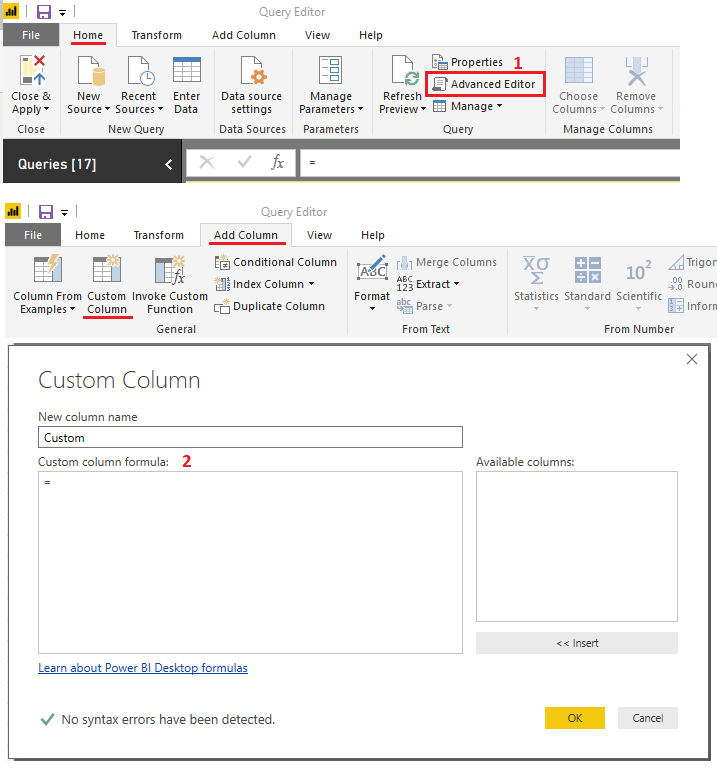
In the Query Editor you can open the Advanced Editor and there Enter works! (no need for ALT)
you can also use Enter when creating a Custom column - in the pop window Enter also works
Hope this helps! ![]()
@MarcelBeugcan probably shed some further light onto this ![]()
Thank you Sam for all the details. After spending some time yesterday researching why Alt+Enter doesn't work in my formula bar... my conclusion was … because of OS (Windows 10). Because I have installed Power BI Desktop on other machine and it works just fine.
I don't know why. I assume it should work. Does it not work for you?
Check out the April 2026 Power BI update to learn about new features.
Sign up to receive a private message when registration opens and key events begin.
If you have recently started exploring Fabric, we'd love to hear how it's going. Your feedback can help with product improvements.
| User | Count |
|---|---|
| 35 | |
| 27 | |
| 26 | |
| 22 | |
| 18 |
| User | Count |
|---|---|
| 67 | |
| 36 | |
| 32 | |
| 26 | |
| 23 |