Join us at FabCon Atlanta from March 16 - 20, 2026, for the ultimate Fabric, Power BI, AI and SQL community-led event. Save $200 with code FABCOMM.
Register now!The Power BI Data Visualization World Championships is back! Get ahead of the game and start preparing now! Learn more
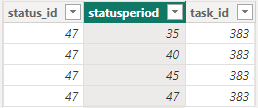
I have a table that looks like this:
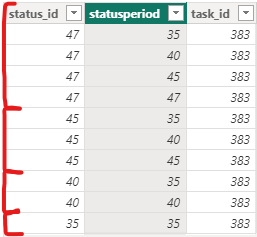
And from that table I want to create a new table that looks like this:
The measure needs to filter the statusperiod (ex. <= 47), add a new column (status_id, 47) and add that to a second table that does the same thing with the next highest statusperiod number (<= 45) and so on until it hits the lowest number in the statusperiod colunm. I know I can do this by creating multiple tables and combining them, but I want it done dynamically so that when more data is added, I don't need to code a new table.
Any help would be appreciated. Thanks!
Hello @vsorensen,
I'd propose such a solution:
However it has limitations - it won't work properly if you have a different combination of task_id and (status_id, statusperiod.
Here's the [DAX] code in text format for convenience:
new_table =
VAR col2 = FILTER ( VALUES( data[statusperiod] ), [statusperiod] < MAX ( data[status_id] ) )
VAR col1 = SELECTCOLUMNS ( col2, "status_id", [statusperiod] )
VAR surplus = CROSSJOIN ( FILTER ( CROSSJOIN ( col1, col2 ), [status_id] >= [statusperiod] ), VALUES ( data[task_id] ) )
RETURN UNION ( data, surplus )
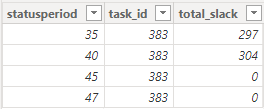
This is great, thank you! Unfortunately, I realized I made a mistake in my initial question: my original table does not have the status_id column but I would like to add it when the new table is generated. How would I do that? Also, how can I tweak this I if I have one more column? I've added a screenshot below of a better representation of my data.
Can you also provide a table which is supposed to be your final result?
The Power BI Data Visualization World Championships is back! Get ahead of the game and start preparing now!
| User | Count |
|---|---|
| 41 | |
| 38 | |
| 36 | |
| 31 | |
| 28 |
| User | Count |
|---|---|
| 129 | |
| 88 | |
| 79 | |
| 68 | |
| 63 |