cancel
Showing results for 
Search instead for 
Did you mean: 

Learn from the best! Meet the four finalists headed to the FINALS of the Power BI Dataviz World Championships! Register now

Reply
vsorensen
Frequent Visitor

Dynamically Generating and Appending Tables Using DAX

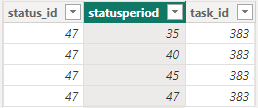
I have a table that looks like this:

vsorensen_0-1680627057673.png

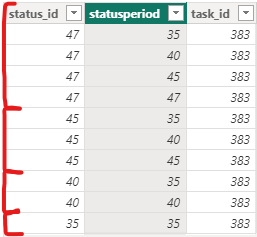
And from that table I want to create a new table that looks like this:

vsorensen_1-1680627346879.png


The measure needs to filter the statusperiod (ex. <= 47), add a new column (status_id, 47) and add that to a second table that does the same thing with the next highest statusperiod number (<= 45) and so on until it hits the lowest number in the statusperiod colunm. I know I can do this by creating multiple tables and combining them, but I want it done dynamically so that when more data is added, I don't need to code a new table. 


Any help would be appreciated. Thanks!

3 REPLIES 3
barritown
Solution Sage
Solution Sage

Hello @vsorensen,

I'd propose such a solution:

barritown_0-1680689684737.png

However it has limitations - it won't work properly if you have a different combination of task_id and (status_id, statusperiod.


Here's the [DAX] code in text format for convenience:

new_table = 
VAR col2 = FILTER ( VALUES( data[statusperiod] ), [statusperiod] < MAX ( data[status_id] ) )
VAR col1 = SELECTCOLUMNS ( col2, "status_id", [statusperiod] )
VAR surplus = CROSSJOIN ( FILTER ( CROSSJOIN ( col1, col2 ), [status_id] >= [statusperiod] ), VALUES ( data[task_id] ) )
RETURN UNION ( data, surplus )

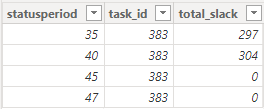
This is great, thank you! Unfortunately, I realized I made a mistake in my initial question: my original table does not have the status_id column but I would like to add it when the new table is generated. How would I do that? Also, how can I tweak this I if I have one more column? I've added a screenshot below of a better representation of my data. 


vsorensen_0-1680722020458.png


Can you also provide a table which is supposed to be your final result?

Helpful resources

Announcements
Join our Fabric User Panel

Join our Fabric User Panel

Share feedback directly with Fabric product managers, participate in targeted research studies and influence the Fabric roadmap.

February Power BI Update Carousel

Power BI Monthly Update - February 2026

Check out the February 2026 Power BI update to learn about new features.

FabCon Atlanta 2026 carousel

FabCon Atlanta 2026

Join us at FabCon Atlanta, March 16-20, for the ultimate Fabric, Power BI, AI and SQL community-led event. Save $200 with code FABCOMM.