Join us at FabCon Atlanta from March 16 - 20, 2026, for the ultimate Fabric, Power BI, AI and SQL community-led event. Save $200 with code FABCOMM.
Register now!Get Fabric certified for FREE! Don't miss your chance! Learn more
Solved! Go to Solution.
Try the following
1. Create table called as Measure with column names - MeasureId, MeasureName
Eg : Row 1 - 1, Quantity
Row 2 - 1, Value
Create as many rows as you want depending on the number of measures you wish to alternate.
2. Create table called TopTable as follows :
TopTable =
Union (
TOPN (10, SUMMARIZE('Product',[Item],"Qty",sum('Product'[StockAvailable]),"Value",0),[Qty],DESC ),
TOPN (10, SUMMARIZE('Product',[Item],"Qty",0,"Value",sum('Product'[StockValue])),[Value],DESC )
)
This is creating a table with columns Item, Sum(StockQty), sum(StockValue) from the Product table. Replace your fact table names accordingly.
3. Create measure ShowMeasure as
ShowMeasure = switch (TRUE,
Min ( 'Measure'[MeasureID] ) = 1,
SUM(TopTable[Qty] ),
Min ( 'Measure'[MeasureID] ) = 2,
SUM ( TopTable[Value] ))
4. Create a Filter using the MeasureName at Step 1.
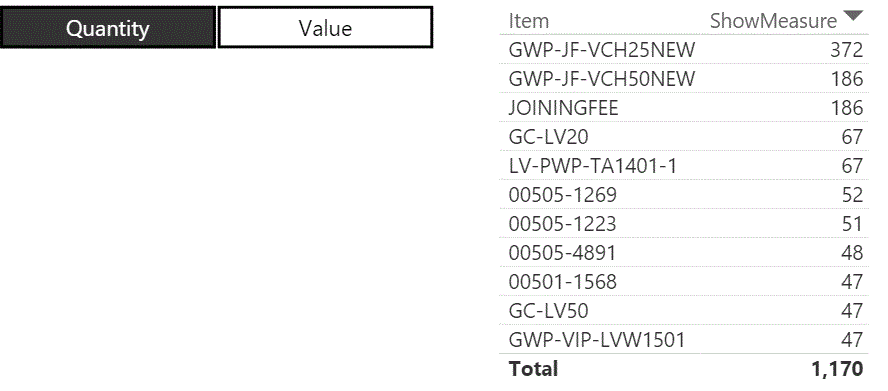
5. Create a report using Item from TopTable and ShowMeasure and in the filters for the report for ShowMeasure set not equal to zero.
6. This will work.
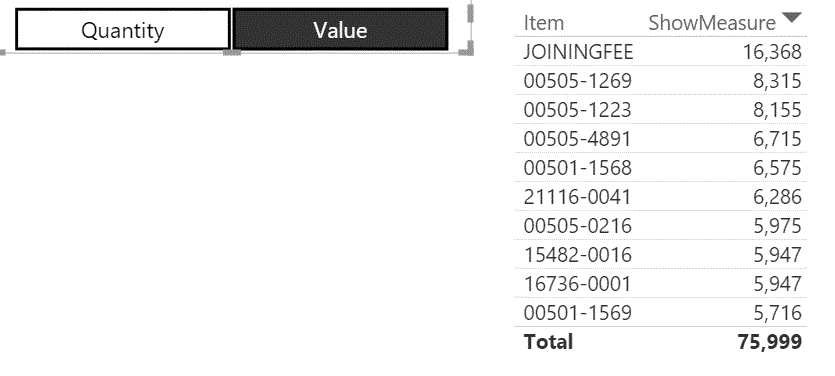
Output when select Value
If this works for you please accept it as solution and also give KUDOS.
Cheers
CheenuSIng
Try the following
1. Create table called as Measure with column names - MeasureId, MeasureName
Eg : Row 1 - 1, Quantity
Row 2 - 1, Value
Create as many rows as you want depending on the number of measures you wish to alternate.
2. Create table called TopTable as follows :
TopTable =
Union (
TOPN (10, SUMMARIZE('Product',[Item],"Qty",sum('Product'[StockAvailable]),"Value",0),[Qty],DESC ),
TOPN (10, SUMMARIZE('Product',[Item],"Qty",0,"Value",sum('Product'[StockValue])),[Value],DESC )
)
This is creating a table with columns Item, Sum(StockQty), sum(StockValue) from the Product table. Replace your fact table names accordingly.
3. Create measure ShowMeasure as
ShowMeasure = switch (TRUE,
Min ( 'Measure'[MeasureID] ) = 1,
SUM(TopTable[Qty] ),
Min ( 'Measure'[MeasureID] ) = 2,
SUM ( TopTable[Value] ))
4. Create a Filter using the MeasureName at Step 1.
5. Create a report using Item from TopTable and ShowMeasure and in the filters for the report for ShowMeasure set not equal to zero.
6. This will work.
Output when select Value
If this works for you please accept it as solution and also give KUDOS.
Cheers
CheenuSIng
can you please share the pbix file
Share feedback directly with Fabric product managers, participate in targeted research studies and influence the Fabric roadmap.
Check out the February 2026 Power BI update to learn about new features.
| User | Count |
|---|---|
| 69 | |
| 60 | |
| 47 | |
| 20 | |
| 16 |