cancel
Showing results for 
Search instead for 
Did you mean: 

Vote for your favorite vizzies from the Power BI Dataviz World Championship submissions. Vote now!

Reply
Nikhilpowerbi
New Member

Dynamic topn()

Is there a way in power bi to display top n rows in a table based on varying criterea such as sales amount, expected sales, actual sales, etc.
1 ACCEPTED SOLUTION
Anonymous
Not applicable

Hi @Nikhilpowerbi


Try the following


1. Create table called as Measure with column names - MeasureId, MeasureName

    Eg :  Row 1 -  1, Quantity

            Row 2 - 1, Value

   Create as many rows as you want depending on the number of measures you wish to alternate.


2.  Create table called TopTable as follows :

         TopTable =
                           Union (
                                  TOPN (10, SUMMARIZE('Product',[Item],"Qty",sum('Product'[StockAvailable]),"Value",0),[Qty],DESC ),
                                  TOPN (10, SUMMARIZE('Product',[Item],"Qty",0,"Value",sum('Product'[StockValue])),[Value],DESC )
                             )

           This is creating  a table with columns Item, Sum(StockQty), sum(StockValue)  from the Product table. Replace your fact table names accordingly.


3.  Create measure ShowMeasure as

     ShowMeasure = switch (TRUE,
              Min ( 'Measure'[MeasureID] ) = 1,
                                       SUM(TopTable[Qty] ),
                            Min ( 'Measure'[MeasureID] ) = 2,
                          SUM ( TopTable[Value] ))


4. Create a Filter using the MeasureName at Step 1.

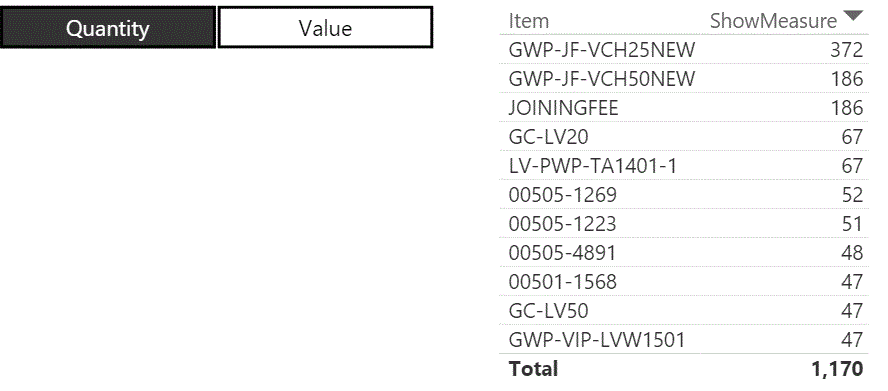
5.  Create a report using Item from TopTable and ShowMeasure and in the filters for the report for ShowMeasure set not equal to zero.

6. This will work.


Capture.GIF


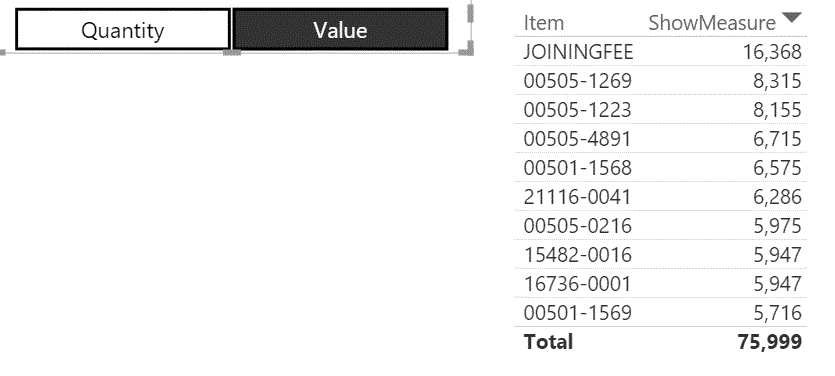
Output when select Value

                            Capture.GIF 


If this works for you please accept it as solution and also give KUDOS.


Cheers

CheenuSIng


View solution in original post

2 REPLIES 2
Anonymous
Not applicable

Hi @Nikhilpowerbi


Try the following


1. Create table called as Measure with column names - MeasureId, MeasureName

    Eg :  Row 1 -  1, Quantity

            Row 2 - 1, Value

   Create as many rows as you want depending on the number of measures you wish to alternate.


2.  Create table called TopTable as follows :

         TopTable =
                           Union (
                                  TOPN (10, SUMMARIZE('Product',[Item],"Qty",sum('Product'[StockAvailable]),"Value",0),[Qty],DESC ),
                                  TOPN (10, SUMMARIZE('Product',[Item],"Qty",0,"Value",sum('Product'[StockValue])),[Value],DESC )
                             )

           This is creating  a table with columns Item, Sum(StockQty), sum(StockValue)  from the Product table. Replace your fact table names accordingly.


3.  Create measure ShowMeasure as

     ShowMeasure = switch (TRUE,
              Min ( 'Measure'[MeasureID] ) = 1,
                                       SUM(TopTable[Qty] ),
                            Min ( 'Measure'[MeasureID] ) = 2,
                          SUM ( TopTable[Value] ))


4. Create a Filter using the MeasureName at Step 1.

5.  Create a report using Item from TopTable and ShowMeasure and in the filters for the report for ShowMeasure set not equal to zero.

6. This will work.


Capture.GIF


Output when select Value

                            Capture.GIF 


If this works for you please accept it as solution and also give KUDOS.


Cheers

CheenuSIng


can you please share the pbix file

Helpful resources

Announcements
Sticker Challenge 2026 Carousel

Join our Community Sticker Challenge 2026

If you love stickers, then you will definitely want to check out our Community Sticker Challenge!

January Power BI Update Carousel

Power BI Monthly Update - January 2026

Check out the January 2026 Power BI update to learn about new features.

FabCon Atlanta 2026 carousel

FabCon Atlanta 2026

Join us at FabCon Atlanta, March 16-20, for the ultimate Fabric, Power BI, AI and SQL community-led event. Save $200 with code FABCOMM.