This time we’re going bigger than ever. Fabric, Power BI, SQL, AI and more. We're covering it all. You won't want to miss it.
Learn moreLevel up your Power BI skills this month - build one visual each week and tell better stories with data! Get started
Hello,
Looking for great advice here...
I'd like to set up dynamic target to a KPI card, the target value list as below. In Biz Unit "B", 3 items are further divided respectively. The column of item remain blank represents the "overall" target of the biz unit.
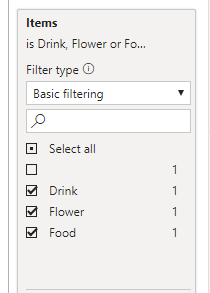
I'd like to set up slicer for "year", "Business Unit" and "items" in the report:
Please advise how I should write a DAX to fultill this?
Any suggestion or comment is appreciated, thanks in advance!!
| Year | Business Unit | Items | Target |
| 2020 | A | 21573 | |
| 2020 | B | 5030 | |
| 2019 | A | 23971 | |
| 2019 | B | 5589 | |
| 2020 | B | Food | 4651 |
| 2020 | B | Flower | 5033 |
| 2020 | B | Drink | 8663 |
| 2019 | B | Food | 5592 |
| 2019 | B | Flower | 5167 |
| 2019 | B | Drink | 9625 |
Solved! Go to Solution.
For year and the business unit it should work. so we need handle item
New measure like
if(isfiltered(Table[Items]), sum(table[Target]),calculate(sum(table[Target]),isblank(Table[Items])))
Refer : https://powerpivotpro.com/2013/03/hasonevalue-vs-isfiltered-vs-hasonefilter/
Hi @OZMckenzie ,
I suggest create a calculated table for slicer item and filter it without showing the blank value:
Table 2 = VALUES('Table'[Items])
Then I suggest you use the measure for goal:
Measure =
IF (
ISFILTERED ( 'Table 2'[Items] ),
CALCULATE (
MAX ( 'Table'[Target] ),
FILTER ( 'Table', 'Table'[Items] in DISTINCT('Table 2'[Items] ))
),
CALCULATE ( MAX ( 'Table'[Target] ), ISBLANK ( 'Table'[Items] )||'Table'[Items] = "")
)
Please refer to the pbix file: https://qiuyunus-my.sharepoint.com/:u:/g/personal/pbipro_qiuyunus_onmicrosoft_com/EVKIbloPrEhHoES8kY...
Best Regards,
Dedmon Dai
For year and the business unit it should work. so we need handle item
New measure like
if(isfiltered(Table[Items]), sum(table[Target]),calculate(sum(table[Target]),isblank(Table[Items])))
Refer : https://powerpivotpro.com/2013/03/hasonevalue-vs-isfiltered-vs-hasonefilter/
Check out the April 2026 Power BI update to learn about new features.
Sign up to receive a private message when registration opens and key events begin.
If you have recently started exploring Fabric, we'd love to hear how it's going. Your feedback can help with product improvements.
| User | Count |
|---|---|
| 35 | |
| 32 | |
| 25 | |
| 22 | |
| 18 |
| User | Count |
|---|---|
| 65 | |
| 35 | |
| 32 | |
| 25 | |
| 23 |