cancel
Showing results for 
Search instead for 
Did you mean: 

Level up your Power BI skills this month - build one visual each week and tell better stories with data! Get started

Reply
OZMckenzie
Helper I
Helper I

Dynamic target

Hello, 


Looking for great advice here...

I'd like to set up dynamic target to a KPI card, the target value list as below.  In Biz Unit "B", 3 items are further divided respectively. The column of item remain blank represents the "overall" target of the biz unit. 


I'd like to set up slicer for "year", "Business Unit" and "items" in the report:

  • If I select year "2020", Biz Unit "B", I hope the target would show "5030";
  • If I select "2020", Biz Unit "B", and item"Food", I hope the target would show "4651";

Please advise how I should write a DAX to fultill this?

Any suggestion or comment is appreciated, thanks in advance!!


YearBusiness UnitItemsTarget
2020A 21573
2020B 5030
2019A 23971
2019B 5589
2020BFood4651
2020BFlower5033
2020BDrink8663
2019BFood5592
2019BFlower5167
2019BDrink9625
1 ACCEPTED SOLUTION
amitchandak
Super User
Super User

@OZMckenzie 

For year and the business unit it should work. so we need handle item

New measure like

if(isfiltered(Table[Items]), sum(table[Target]),calculate(sum(table[Target]),isblank(Table[Items])))


Refer : https://powerpivotpro.com/2013/03/hasonevalue-vs-isfiltered-vs-hasonefilter/

Share with Power BI Enthusiasts: Full Power BI Video (20 Hours) YouTube
Microsoft Fabric Series 60+ Videos YouTube
Microsoft Fabric Hindi End to End YouTube

View solution in original post

4 REPLIES 4
v-deddai1-msft
Community Support
Community Support

Hi @OZMckenzie ,


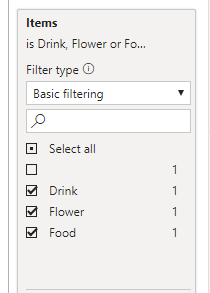
I suggest create a calculated table for slicer item and filter it without showing the blank value:


Table 2 = VALUES('Table'[Items])


Untitled picture2.png


Then I suggest you use the measure for goal:


Measure =

IF (

ISFILTERED ( 'Table 2'[Items] ),

CALCULATE (

MAX ( 'Table'[Target] ),

FILTER ( 'Table', 'Table'[Items] in DISTINCT('Table 2'[Items] ))

),

CALCULATE ( MAX ( 'Table'[Target] ), ISBLANK ( 'Table'[Items] )||'Table'[Items] = "")

)


Please refer to the pbix file: https://qiuyunus-my.sharepoint.com/:u:/g/personal/pbipro_qiuyunus_onmicrosoft_com/EVKIbloPrEhHoES8kY...


Best Regards,

Dedmon Dai

Thank you @v-deddai1-msft  for your great advice.

I will try it as well.

amitchandak
Super User
Super User

@OZMckenzie 

For year and the business unit it should work. so we need handle item

New measure like

if(isfiltered(Table[Items]), sum(table[Target]),calculate(sum(table[Target]),isblank(Table[Items])))


Refer : https://powerpivotpro.com/2013/03/hasonevalue-vs-isfiltered-vs-hasonefilter/

Share with Power BI Enthusiasts: Full Power BI Video (20 Hours) YouTube
Microsoft Fabric Series 60+ Videos YouTube
Microsoft Fabric Hindi End to End YouTube

This is very helpful, thank you very much! @amitchandak 


Helpful resources

Announcements
April Power BI Update Carousel

Power BI Monthly Update - April 2026

Check out the April 2026 Power BI update to learn about new features.

Fabric SQL PBI Data Days

Data Days 2026 coming soon!

Sign up to receive a private message when registration opens and key events begin.

New to Fabric survey Carousel

New to Fabric Survey

If you have recently started exploring Fabric, we'd love to hear how it's going. Your feedback can help with product improvements.

Power BI DataViz World Championships carousel

Power BI DataViz World Championships - June 2026

A new Power BI DataViz World Championship is coming this June! Don't miss out on submitting your entry.