Join us at FabCon Atlanta from March 16 - 20, 2026, for the ultimate Fabric, Power BI, AI and SQL community-led event. Save $200 with code FABCOMM.
Register now!The Power BI Data Visualization World Championships is back! Get ahead of the game and start preparing now! Learn more
Hello,
Looking for great advice here...
I'd like to set up dynamic target to a KPI card, the target value list as below. In Biz Unit "B", 3 items are further divided respectively. The column of item remain blank represents the "overall" target of the biz unit.
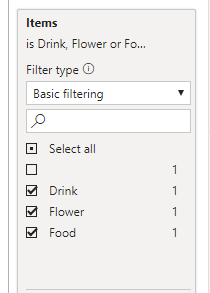
I'd like to set up slicer for "year", "Business Unit" and "items" in the report:
Please advise how I should write a DAX to fultill this?
Any suggestion or comment is appreciated, thanks in advance!!
| Year | Business Unit | Items | Target |
| 2020 | A | 21573 | |
| 2020 | B | 5030 | |
| 2019 | A | 23971 | |
| 2019 | B | 5589 | |
| 2020 | B | Food | 4651 |
| 2020 | B | Flower | 5033 |
| 2020 | B | Drink | 8663 |
| 2019 | B | Food | 5592 |
| 2019 | B | Flower | 5167 |
| 2019 | B | Drink | 9625 |
Solved! Go to Solution.
For year and the business unit it should work. so we need handle item
New measure like
if(isfiltered(Table[Items]), sum(table[Target]),calculate(sum(table[Target]),isblank(Table[Items])))
Refer : https://powerpivotpro.com/2013/03/hasonevalue-vs-isfiltered-vs-hasonefilter/
Hi @OZMckenzie ,
I suggest create a calculated table for slicer item and filter it without showing the blank value:
Table 2 = VALUES('Table'[Items])
Then I suggest you use the measure for goal:
Measure =
IF (
ISFILTERED ( 'Table 2'[Items] ),
CALCULATE (
MAX ( 'Table'[Target] ),
FILTER ( 'Table', 'Table'[Items] in DISTINCT('Table 2'[Items] ))
),
CALCULATE ( MAX ( 'Table'[Target] ), ISBLANK ( 'Table'[Items] )||'Table'[Items] = "")
)
Please refer to the pbix file: https://qiuyunus-my.sharepoint.com/:u:/g/personal/pbipro_qiuyunus_onmicrosoft_com/EVKIbloPrEhHoES8kY...
Best Regards,
Dedmon Dai
For year and the business unit it should work. so we need handle item
New measure like
if(isfiltered(Table[Items]), sum(table[Target]),calculate(sum(table[Target]),isblank(Table[Items])))
Refer : https://powerpivotpro.com/2013/03/hasonevalue-vs-isfiltered-vs-hasonefilter/
The Power BI Data Visualization World Championships is back! Get ahead of the game and start preparing now!
| User | Count |
|---|---|
| 39 | |
| 37 | |
| 33 | |
| 32 | |
| 29 |
| User | Count |
|---|---|
| 132 | |
| 86 | |
| 85 | |
| 68 | |
| 64 |