Join us in Barcelona for FabCon and SQLCon, September 28 - October 1, 2026.
This is best Fabric, Power BI, SQL and AI community event. How do we know? The last event sold out! Save €200 with code FABCMTY200.
Register now- Power BI forums
- Get Help with Power BI
- Desktop
- Service
- Report Server
- Power Query
- Mobile Apps
- Developer
- DAX Commands and Tips
- Custom Visuals Development Discussion
- Health and Life Sciences
- Power BI Spanish forums
- Translated Spanish Desktop
- Training and Consulting
- Instructor Led Training
- Dashboard in a Day for Women, by Women
- Galleries
- Data Stories Gallery
- Themes Gallery
- Contests Gallery
- QuickViz Gallery
- Quick Measures Gallery
- Visual Calculations Gallery
- Fabric Apps Gallery
- Notebook Gallery
- Translytical Task Flow Gallery
- TMDL Gallery
- R Script Showcase
- Webinars and Video Gallery
- Ideas
- Custom Visuals Ideas (read-only)
- Issues
- Issues
- Events
- Upcoming Events
The Fabric community is now in read-only for platform upgrade. Learn more
- Power BI forums
- Forums
- Get Help with Power BI
- Desktop
- Re: Dynamic start date filter (Powerpivot)
- Subscribe to RSS Feed
- Mark Topic as New
- Mark Topic as Read
- Float this Topic for Current User
- Bookmark
- Subscribe
- Printer Friendly Page

- Mark as New
- Bookmark
- Subscribe
- Mute
- Subscribe to RSS Feed
- Permalink
Dynamic start date filter (Powerpivot)
I simply cant figure out how to create a dynamic measure, that only counts start dates, where there is at lapse of at least 3 months since the last enddate.
I have a table with customers, that also include a "DateCaseStart" and a "CaseDateEnd" per line. The problem is that I only want a measure that can count a StartDate as a new startdate IF there is a timelapse of more than 3. months since last "CaseDateEnd" date.
Anyone that can figure this one out?
CustomerCaseDateStartCaseDateEnd
Customer1 | 01-03-2017 | 04-04-2017 |
Customer1 | 01-09-2017 | 31-12-2070 |
Customer2 | 05-05-2017 | 12-06-2017 |
Customer3 | 21-09-2017 | 22-09-2017 |
Customer3 | 21-09-2017 | 31-12-2070 |
Customer4 | 25-08-2017 | 09-11-2017 |
Customer5 | 25-10-2017 | 31-12-2070 |
Customer6 | 10-05-2017 | 08-06-2017 |
Customer6 | 30-08-2017 | 31-12-2070 |
Customer7 | 01-09-2017 | 31-12-2070 |
Customer8 | 28-06-2017 | 30-07-2017 |
Customer8 | 12-09-2017 | 31-12-2070 |
Link to example file: https://drive.google.com/open?id=1BV6-J8MuBup7jk_ZQwaH4eIA61-yrH40


- Mark as New
- Bookmark
- Subscribe
- Mute
- Subscribe to RSS Feed
- Permalink
Hi @LonePedersen,
Just to confirm are you only trying to display or count records when End Date 3 month greater than Start Date???
- Like the record below is ok right?
Customer1
01-09-2017
31-12-2070
Regards
Abduvali
- Mark as New
- Bookmark
- Subscribe
- Mute
- Subscribe to RSS Feed
- Permalink
Hi @Abduvali,
Not exactly. Last enddate has to be more than 3 month prior to next startdate.
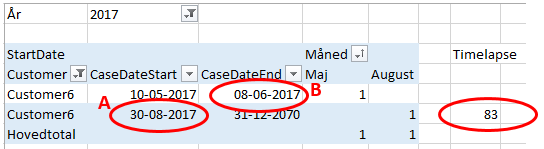
I have given a couple of examples in the linked file. For instance Customer6:
There is a timelapse of 83 days (less than 3 months) between first "CaseDateEnd" (B) date and next "CaseDateStart" (A).
Therefore the measure shoulde only count the first "CaseDateStart" (10-05-2017) and not the second.
My problem is that i want a measure that can count start dates, but i want to filter the start dates, based on data from another row and column.....
Hopes it makes sense.
- Mark as New
- Bookmark
- Subscribe
- Mute
- Subscribe to RSS Feed
- Permalink
I think I got it to work using IF statements using 2 additional columns:
- this checks for the newest Start Date
- New Start Date = if((Sheet6[New Date]-Sheet6[End])>=89,Sheet6[New Date],Sheet6[Start])
- And the second column will let you count the dates that are greater than 3 month
- Count Dates = if((if(Sheet6[End]>Sheet6[New Start Date],0,DATEDIFF(Sheet6[End],Sheet6[New Start Date],DAY)))=0,0,1)
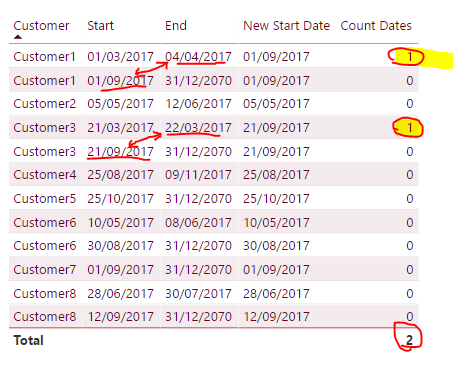
Check it out and see how you get on maybe someone will propose a better solution.
Regards
Abduvali
- Mark as New
- Bookmark
- Subscribe
- Mute
- Subscribe to RSS Feed
- Permalink
Hi @Abduvali,
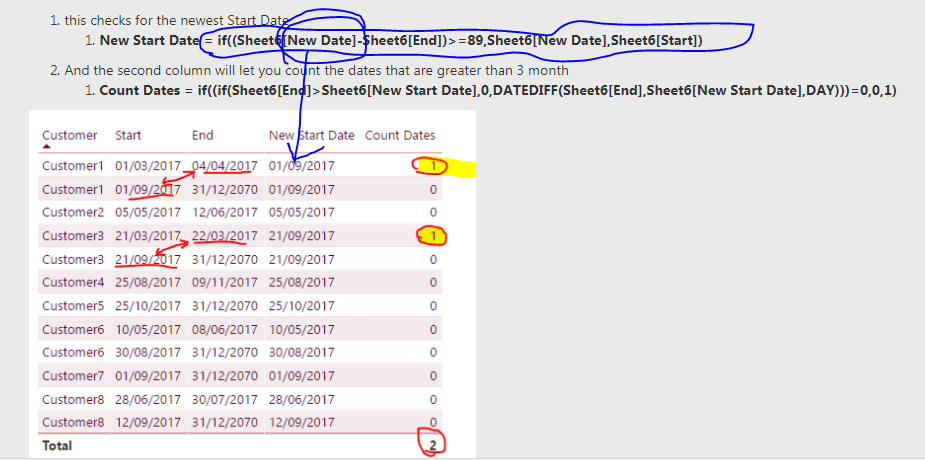
Thanks, looks exactly like what I am looking for. I just keep getting a circular reference. I think I may be skipping a step.
In the DAX function "New Start Date", there is a IF function containing a field named [New Date]. Is that at column ore a measure that I cant see?
I have tried this DAX formula, but it is here the circular reference occurs.
=if((Tabel1[NewStartDate]-Tabel1[CaseDateEnd])>=89,Tabel1[NewStartDate],Tabel1[CaseDateStart])
Regards
Lone
- Mark as New
- Bookmark
- Subscribe
- Mute
- Subscribe to RSS Feed
- Permalink
Sorry, mate its 3 columns you need I just omitted New Date one =oP
- New Date = (CALCULATE(MAX(Sheet6[Start]),ALLEXCEPT(Sheet6,Sheet6[Customer])))
Regards
Abduvali
- Mark as New
- Bookmark
- Subscribe
- Mute
- Subscribe to RSS Feed
- Permalink
Hi @Abduvali,
Thank you, this fixed the problem. But i didnt notice witch date was accepted as counts.
In the following table I have tried to make a column (like your table), that counts witch start dates, i want to include.
Customer 1: Both start dates is in the count because, there is a totalt count of 150 days between the last end date, and next start date (04-04-2017 to 01-09-2017).
Customer 6: Firstly I've added a additinal line. This table is just an example for a huge dataset I am working with, and here there woulde be severeal lines per customer. At first I thought I could use the "NewDate" Date you calculated earlyer. But I realised that when I use the solution in the big data set, the MAX date function woulde become a problem, because there can be a lot of start and end dates per customer.
In the folllowing table the measure/function has to count two new start dates from customer 6:
- First timeperiod (01-01-2017 - 20-01-2017) has a count of 1 because it is the first startdate for the customer (no prior end date)
- Second timerperiod (10-05-2017 - 08-06-2017) has a count of 1 because timelapse between end date 20-01-2017 and next start date 10-05-2017) is 150 days.
- Third timeperiod (30-08-2017 - 31-12-2070) has a count of 0 because timelapse between the last end date 08-06-2017 and next start date 30-08.2017) is 83 days.
CustomerCaseDateStartCaseDateEndCountTotal 9
| Days between start and end | ||||
| Customer1 | 01-03-2017 | 04-04-2017 | 1 | |
| Customer1 | 01-09-2017 | 31-12-2070 | 1 | 150,00 |
| Customer2 | 05-05-2017 | 12-06-2017 | 1 | |
| Customer3 | 21-09-2017 | 22-09-2017 | 1 | |
| Customer3 | 21-09-2017 | 31-12-2070 | 0 | -1,00 |
| Customer4 | 25-08-2017 | 09-11-2017 | 1 | |
| Customer5 | 25-10-2017 | 31-12-2070 | 1 | |
| Customer6 | 01-01-2017 | 20-01-2017 | 1 | |
| Customer6 | 10-05-2017 | 08-06-2017 | 0 | 110,00 |
| Customer6 | 30-08-2017 | 31-12-2070 | 0 | 83,00 |
| Customer7 | 01-09-2017 | 31-12-2070 | 1 | |
| Customer8 | 28-06-2017 | 30-07-2017 | 1 | |
| Customer8 | 12-09-2017 | 31-12-2070 | 0 | 44,00 |
Thank you for taking out time, to look at my problem.
Regards Lone
- Mark as New
- Bookmark
- Subscribe
- Mute
- Subscribe to RSS Feed
- Permalink
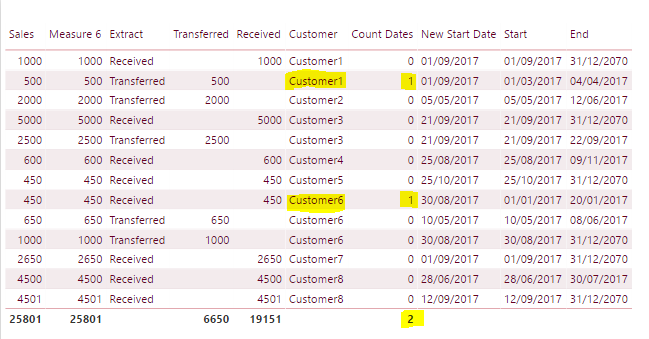
See table below all work as expected, I think you got your Count dates formula wrong make sure you didn't mix up between < or > signs in the formula.
- Mark as New
- Bookmark
- Subscribe
- Mute
- Subscribe to RSS Feed
- Permalink
Hi @Abduvali,
I dont have a problem with the formula - The formula works perfectly.
The problem is, that it dosent count the correct start dates. If you se my table, I have a count of two for customer 1, because there is more than 3 months (or 90 days) between the end date (04-04-2017) and the next start date (01-09-2017). In your table there is only a count of one.
Sorry if I am explaining the problem incorrectly.
Regards
Lone

Helpful resources

FabCon & SQLCon – Barcelona 2026
Join us in Barcelona for FabCon and SQLCon, the Fabric, Power BI, SQL, and AI community event. Save €200 with code FABCMTY200.

Power BI DataViz World Championships - June 2026
A new Power BI DataViz World Championship is coming this June! Don't miss out on submitting your entry.

| User | Count |
|---|---|
| 21 | |
| 21 | |
| 14 | |
| 14 | |
| 13 |


| User | Count |
|---|---|
| 47 | |
| 35 | |
| 24 | |
| 20 | |
| 19 |


