Learn from the best! Meet the four finalists headed to the FINALS of the Power BI Dataviz World Championships! Register now
I have a chart, where I would like to show the previous 16 weeks. It seems the dates/calendar table is not registrered as a number value, rather than dates, so the relative date filter is not an option.
Can anyone help me fix this? I'm working in a SSAS live connection, so I feel like my options are limited.
Solved! Go to Solution.
HI, @Anonymous
You may try this way like below:
For you are working in a SSAS live connection, all the modeling process need to be done in ssas, so you need to add a week
column for date field.
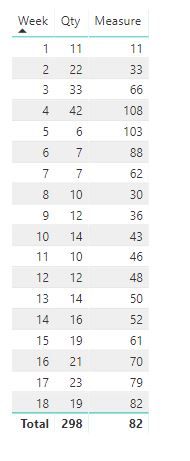
Then create a measure in power bi like this:
Measure = VAR __LASTWEEK = MAX(Table2[Week])
RETURN
SUMX(
FILTER(ALL(Table2),Table2[Week]<=__LASTWEEK&&Table2[Week]>=__LASTWEEK-3),
CALCULATE(SUM('Table2'[Qty]))
)
For example:
Best Regards,
Lin
HI, @Anonymous
You may try this way like below:
For you are working in a SSAS live connection, all the modeling process need to be done in ssas, so you need to add a week
column for date field.
Then create a measure in power bi like this:
Measure = VAR __LASTWEEK = MAX(Table2[Week])
RETURN
SUMX(
FILTER(ALL(Table2),Table2[Week]<=__LASTWEEK&&Table2[Week]>=__LASTWEEK-3),
CALCULATE(SUM('Table2'[Qty]))
)
For example:
Best Regards,
Lin
If you have recently started exploring Fabric, we'd love to hear how it's going. Your feedback can help with product improvements.
A new Power BI DataViz World Championship is coming this June! Don't miss out on submitting your entry.
Share feedback directly with Fabric product managers, participate in targeted research studies and influence the Fabric roadmap.
| User | Count |
|---|---|
| 57 | |
| 33 | |
| 33 | |
| 19 | |
| 18 |
| User | Count |
|---|---|
| 68 | |
| 67 | |
| 45 | |
| 30 | |
| 28 |