Join us at FabCon Atlanta from March 16 - 20, 2026, for the ultimate Fabric, Power BI, AI and SQL community-led event. Save $200 with code FABCOMM.
Register now!The Power BI Data Visualization World Championships is back! It's time to submit your entry. Live now!
I have a chart, where I would like to show the previous 16 weeks. It seems the dates/calendar table is not registrered as a number value, rather than dates, so the relative date filter is not an option.
Can anyone help me fix this? I'm working in a SSAS live connection, so I feel like my options are limited.
Solved! Go to Solution.
HI, @Anonymous
You may try this way like below:
For you are working in a SSAS live connection, all the modeling process need to be done in ssas, so you need to add a week
column for date field.
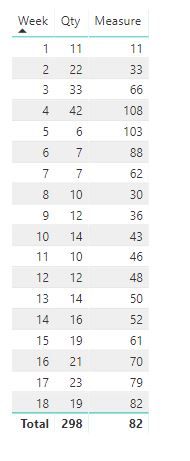
Then create a measure in power bi like this:
Measure = VAR __LASTWEEK = MAX(Table2[Week])
RETURN
SUMX(
FILTER(ALL(Table2),Table2[Week]<=__LASTWEEK&&Table2[Week]>=__LASTWEEK-3),
CALCULATE(SUM('Table2'[Qty]))
)
For example:
Best Regards,
Lin
HI, @Anonymous
You may try this way like below:
For you are working in a SSAS live connection, all the modeling process need to be done in ssas, so you need to add a week
column for date field.
Then create a measure in power bi like this:
Measure = VAR __LASTWEEK = MAX(Table2[Week])
RETURN
SUMX(
FILTER(ALL(Table2),Table2[Week]<=__LASTWEEK&&Table2[Week]>=__LASTWEEK-3),
CALCULATE(SUM('Table2'[Qty]))
)
For example:
Best Regards,
Lin
| User | Count |
|---|---|
| 50 | |
| 40 | |
| 31 | |
| 24 | |
| 22 |
| User | Count |
|---|---|
| 134 | |
| 112 | |
| 57 | |
| 44 | |
| 38 |